

HTML Layout Elements
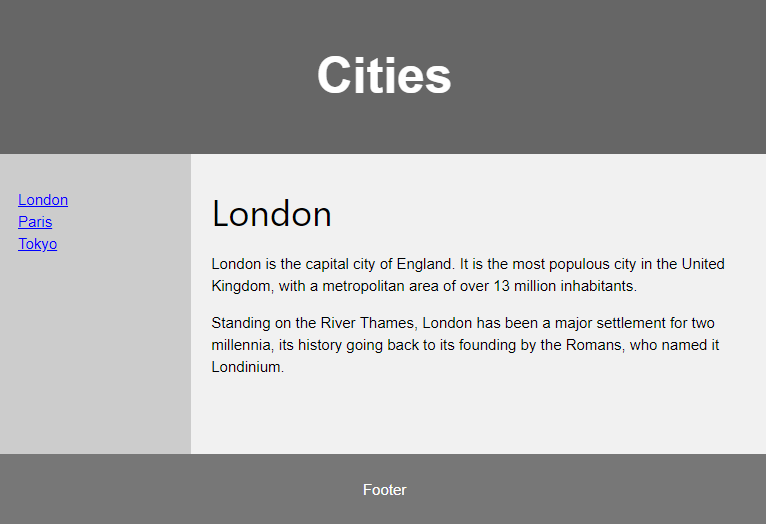
Websites often display content in multiple columns (like a magazine or newspaper).
HTML5 offers new semantic elements that define the different parts of a web page:
 |
<header> – Defines a header for a document or a section
<nav> – Defines a container for navigation links <section> – Defines a section in a document <article> – Defines an independent self-contained article <aside> – Defines content aside from the content (like a sidebar) <footer> – Defines a footer for a document or a section <details> – Defines additional details <summary> – Defines a heading for the <details> element |
HTML Layout Techniques
There are four different ways to create multicolumn layouts. Each way has its pros and cons:
- HTML tables (not recommended)
- CSS float property
- CSS flexbox
- CSS framework
Which One to Choose?
HTML Tables
The <table> element was not designed to be a layout tool! The purpose of the <table> element is to display tabular data. So, do not use tables for your page layout! They will bring a mess into your code. And imagine how hard it will be to redesign your site after a couple of months.
CSS Frameworks
If you want to create your layout fast, you can use a framework, like W3.CSS or Bootstrap.
CSS Floats
It is common to do entire web layouts using the CSS float property. Float is easy to learn – you just need to remember how the float and clear properties work. Disadvantages: Floating elements are tied to the document flow, which may harm the flexibility. Learn more about float in our CSS Float and Clear chapter.

