

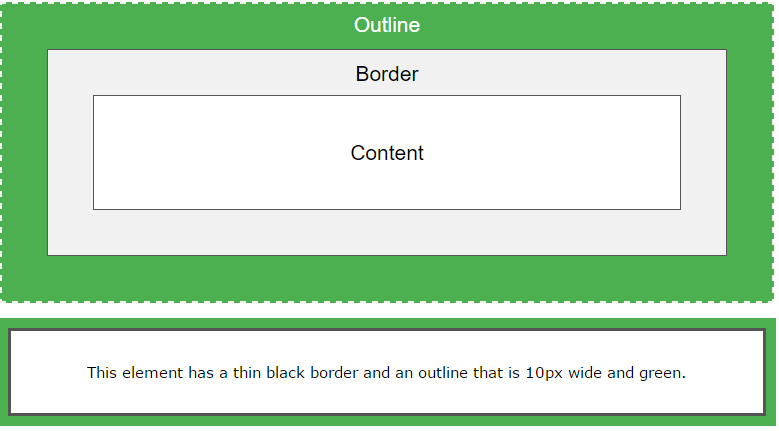
An outline is a line that is drawn around elements (outside the borders) to make the element “stand out”.
However, the outline property is different from the border property – The outline is NOT a part of an element’s dimensions; the element’s total width and height is not affected by the width of the outline.
Outline Style
The outline-style property specifies the style of the outline.
The outline-style property can have one of the following values:
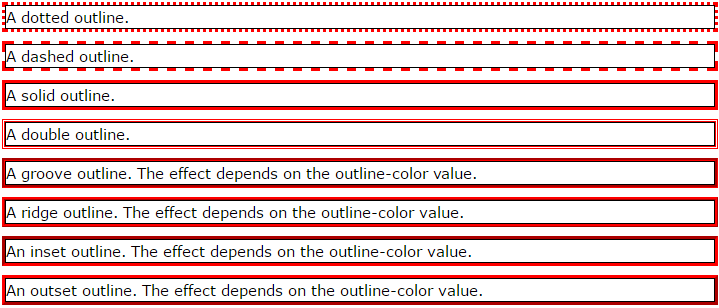
- dotted – Defines a dotted outline
- dashed – Defines a dashed outline
- solid – Defines a solid outline
- double – Defines a double outline
- groove – Defines a 3D grooved outline. The effect depends on the outline-color value
- ridge – Defines a 3D ridged outline. The effect depends on the outline-color value
- inset – Defines a 3D inset outline. The effect depends on the outline-color value
- outset – Defines a 3D outset outline. The effect depends on the outline-color value
- none – Defines no outline
- hidden – Defines a hidden outline
The following example first sets a thin black border around each <p> element, then it shows the different outline-style values:
Example
p {
border: 1px solid black;
outline-color: red;
}
p.dotted {outline-style: dotted;}
p.dashed {outline-style: dashed;}
p.solid {outline-style: solid;}
p.double {outline-style: double;}
p.groove {outline-style: groove;}
p.ridge {outline-style: ridge;}
p.inset {outline-style: inset;}
p.outset {outline-style: outset;}
Result:

Outline Color
The outline-color property is used to set the color of the outline.
The color can be set by:
- name – specify a color name, like “red”
- RGB – specify a RGB value, like “rgb(255,0,0)”
- Hex – specify a hex value, like “#ff0000”
- invert – performs a color inversion (which ensures that the outline is visible, regardless of color background)
Example
p {
border: 1px solid black;
outline-style: double;
outline-color: red;
}
Result:

Outline Width
The outline-width property specifies the width of the outline.
The width can be set as a specific size (in px, pt, cm, em, etc) or by using one of the three pre-defined values: thin, medium, or thick.
Example
p {border: 1px solid black;}
p.one {
outline-style: double;
outline-color: red;
outline-width: thick;
}
p.two {
outline-style: double;
outline-color: green;
outline-width: 3px;
}
Result:

Outline – Shorthand property
To shorten the code, it is also possible to specify all the individual outline properties in one property.
The outline property is a shorthand property for the following individual outline properties:
- outline-width
- outline-style (required)
- outline-color
Example
p {
border: 1px solid black;
outline: 5px dotted red;
}
Result:

All CSS Outline Properties
|
Property
|
Description
|
|---|---|
| outline | Sets all the outline properties in one declaration |
| outline-color | Sets the color of an outline |
| outline-offset | Specifies the space between an outline and the edge or border of an element |
| outline-style | Sets the style of an outline |
| outline-width | Sets the width of an outline |

