

Summary
(Overview and data file are are found here)
SPSS has two variable types: string variables and numeric variables. String variables have “String” under Type in . All other variables are numeric. The screenshot below illustrates this point for hotel_evaluation.sav.

3. Undesirable Variable Types
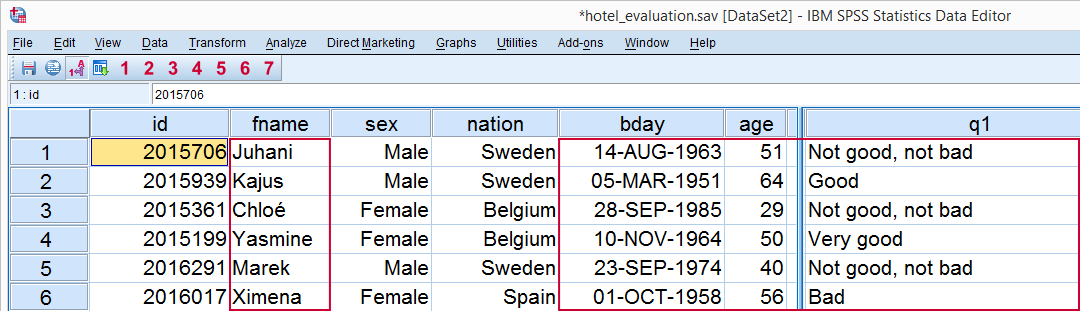
A problem with some data files is that they contain string variables that should have been numeric. A rule of thumb is thatonly nominal variables with many distinct values should be string variables.Right. In we see that fname, bday, age and q1 are string variables. The screenshot below shows them in .
Examples
First, fname holds respondents’ first names. Is it nominal? Yes. Does it have many different values? Yes. Conclusion: it’s an appropriate string variable. No problem here.
Second, bday holds respondents’ birthdays. Is it nominal? No. Conclusion: this should have been a numeric variable. More precisely, it should be a date variable (which is also a numeric variable). Solution: convert it. Convert String to Date Variable shows how to do so but we’ll skip that for now.
Third, age is also a metric instead of a nominal variable and thus had better be converted to numeric as well. We’ll cover this in SPSS Convert String to Numeric Variable but we’ll skip it for now.
Fourth, q1 appears to be an ordinal variable. It’s not nominal and it doesn’t have many distinct values either so it’s not a proper string variable. A labeled numeric variable (similar to q2 for example) would be appropriate here. For now, we’ll skip converting it.

