

A teacher held a course evaluation. The data in SPSS format are in course_evaluation.sav, part of which is shown below. Students from different majors participated and now the education director wants separate Excel files for each major. A super easy way for creating these is by using SPSS with Python. We’ll walk you through.

1. Save SPSS Data as Excel File
We’ll first just create syntax for saving all data as a single Excel file from SPSS’ menu. We’ll navigate to  and fill it out as below.

This results in the syntax below. We won’t run it yet but we’ll need it later on.
1 2 3 4 5 6 7 8 |
*Save all cases as Excel file (as pasted from menu). SAVE TRANSLATE OUTFILE=’D:\data\course_evaluation.xlsx’ /TYPE=XLS /VERSION=12 /FIELDNAMES /CELLS=LABELS /REPLACE. |
2. Selecting Which Cases to Save
Our first syntax saves all cases -that is, all majors- as one Excel file. A neat way to save only a subset of cases -one major at the time- is using SELECT IF and preceding it with TEMPORARY. Like so, we could copy-paste-edit our syntax for each major. We’ll have Python do just that for us. But first we’ll convert our study majors into an SPSS string variable with the syntax below.
1 2 3 4 5 6 7 |
*Create SPSS string variable holding value labels for major. string smajor (a20).compute smajor = valuelabel(major).crosstabs major by smajor. |
Result

3. Look Up Data Values with Spssdata
A Python SPSS module developed for looking up data values is spssdata. Doing so is super easy as shown by the syntax below. The main pitfall here is using the correct casing, which is spssdata.Spssdata.
1 2 3 4 5 6 7 |
*Look up and report all SPSS data values in smajor. begin program. import spssdata for case in spssdata.Spssdata(‘smajor’): print case end program. |
Result

4. Cleaning Up Our Majors
As we see, Python returns a tuple for each case holding a student’s major as a Python-string. We’ll first extract this first (and only) element from each tuple by succeeding it with [0] as shown below.
Note that each major is right padded with spaces up to a total length of 20. This is because its variable format in SPSS is A20. In Python, we’ll remove these spaces with strip().
1 2 3 4 5 6 7 |
*Get Python string values from tuples and strip off spaces. begin program. import spssdata for case in spssdata.Spssdata(‘smajor’): print case[0].strip() end program. |
5. Unduplicating Our Majors
At this point, Python retrieves all majors in a good, clean way. But since we only need the create one Excel file for each distinct major, we need to unduplicate these. We’ll first create an empty Python list object. We’ll then add each major to this list only if it’s not yet in there.
1 2 3 4 5 6 7 8 9 10 11 |
*Create Python list holding all distinct values in smajor. begin program. import spssdata majors = [] for case in spssdata.Spssdata(‘smajor’): major = case[0].strip() if major not in majors: majors.append(major) print majors end program. |
Result

6. Create and Inspect SPSS Syntax
Our Python list of distinct majors looks great! If you’re very paranoid, run FREQUENCIES SMAJOR.in SPSS to confirm that these really are the majors in our data. Now that we have this in place, we won’t recreate it but proceed with the second step.
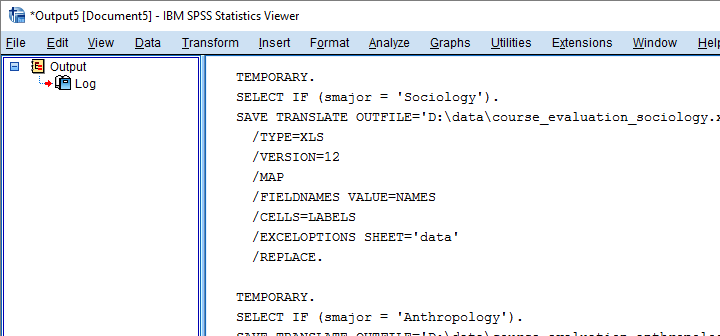
The syntax below first creates an empty Python string. Next, we’ll loop over distinct majors and concatenate some SPSS syntax to it that we created earlier from the menu. In this syntax, we added %s which we use for a Python text replacement. The result is a substantial block of SPSS syntax which we’ll first inspect.
1 2 3 4 5 6 7 8 9 10 11 12 13 14 15 16 17 |
*Create SPSS SAVE TRANSLATE command for each value in majors. begin program. spssSyntax = ” for major in majors: spssSyntax += ”’ TEMPORARY. SELECT IF (smajor = ‘%s’). SAVE TRANSLATE OUTFILE=’D:\data\course_evaluation_%s.xlsx’ /TYPE=XLS /VERSION=12 /FIELDNAMES /CELLS=LABELS /REPLACE. ”’%(major,major.lower()) print spssSyntax end program. |
Result
7. Run Our Syntax
Since our syntax looks fine, we’ll run it with spss.Submit. In order to use this, we still need to import the spss module because we hadn’t done so thus far.
1 2 3 4 5 6 |
*Run the syntax we just created and inspected. begin program. import spss spss.Submit(spssSyntax) end program. |
Result

Final Notes
In short, Python can very easily look up data values with spssdata.Spssdata(). Restrict it to a single variable by specifying its name in the parentheses. Leaving the parentheses empty looks up the data values of all variables. Once we have our data values in Python, we can insert them into SPSS syntax or do a ton of other stuff with them.

