

xlrd is a module that allows Python to read data from Excel files.
This tutorial explains where to get it and how to install it.
Downloading the Python Xlrd Module
- The Python xlrd (short for “Excel Read”) module can be found here. After downloading it, you can extract the contents (twice) with 7 Zip.
- Copy the path of the folder that holds “setup.py”.
- Note that there’s also a Python module for writing MS Excel files. It’s called xlwt (“Excel Write”) and can be found here.
- The installation process is basically identical to installing xlrd as explained below.
Adding an Environment Variable
 Add Python to Path under Environment Variables in Windows
- The installation process is basically identical for Windows 8, Windows 7, Windows Vista and even Windows XP.
- First, right click
 . Then select .
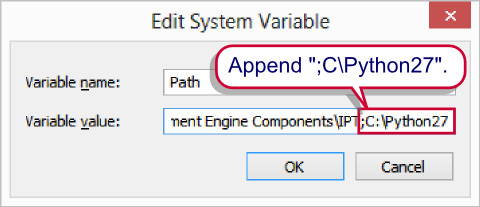
- At the end of the path, add the path to the folder in which “python.exe” is located. For most SPSS versions this will be something like
;C:\Python27. However, for more recent versions of SPSS, Python is installed in the SPSS installation folder, for exampleC:\Program Files\IBM\SPSS\Statistics\22\Python - Confirm by clicking “Ok”. At a later step, we’ll call Python from the Windows Command Line. This step ensures that
pythonis recognized as an existing application when this is done.
Installing the Python Xlrd Module
Now we’ll access the MS Windows Command Prompt. On recent Windows versions, you may need to run the command prompt as an administrator. If you search your programs for cmd, the command prompt should come up. Right-click it and select “Run as administrator”.

Now we’ll first set the folder where “setup.py” is located as the default directory, for example by chdir /D D:\Downloads\xlrd-0.9.2.tar\dist\xlrd-0.9.2\xlrd-0.9.2. Note that the path can be pasted into the window with a right mouse click. All that’s now left to do is the actual installation by running python setup.py install. After doing so, you should be good to go.
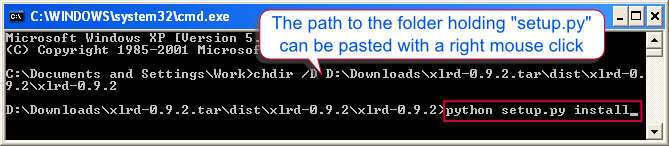 Python Xlrd Installation – Final Step

