USB Storage Capacity
USB flash drive capacities range from under 1 GB to over 1 TB. There’s no “right” size for a flash drive; the amount of storage you need depends on how much data you want to store. For example, if you’re going to grab a few Word or Excel files from one computer, a 1 GB flash drive might give you more than enough capacity. However, if you plan to back up all your files, you could need anywhere from a few GB to 500 GB or more.
If you want to store all the images and videos from your phone, go into your phone’s settings and see how much space your media files are taking up. It could be anywhere from 1 GB to several dozen GB. Whatever it is, that’s the minimum amount of storage you need, considering you might add more files in the future. You can use the same method for other types of files, such as MP4s. Remember to consider what types of files you might want to store on the same drive.
USB Transfer Speed
Another factor you need to consider when shopping for a flash drive is transfer speed. There are two types of USB flash drives: USB 2.0, which is an older standard, and USB 3.0, which is a newer one. The transfer speed for USB 2.0 is 480 Mbps, and USB 3.0 is 4,800 Mbps or 4.5 Gbps. That means USB 3.0 is approximately ten times faster than USB 2.0.
NOTE: Generally, a 16 GB file, like a digital video project, will transfer in less than a minute using USB 3.0 but will take nearly nine minutes when using USB 2.0.
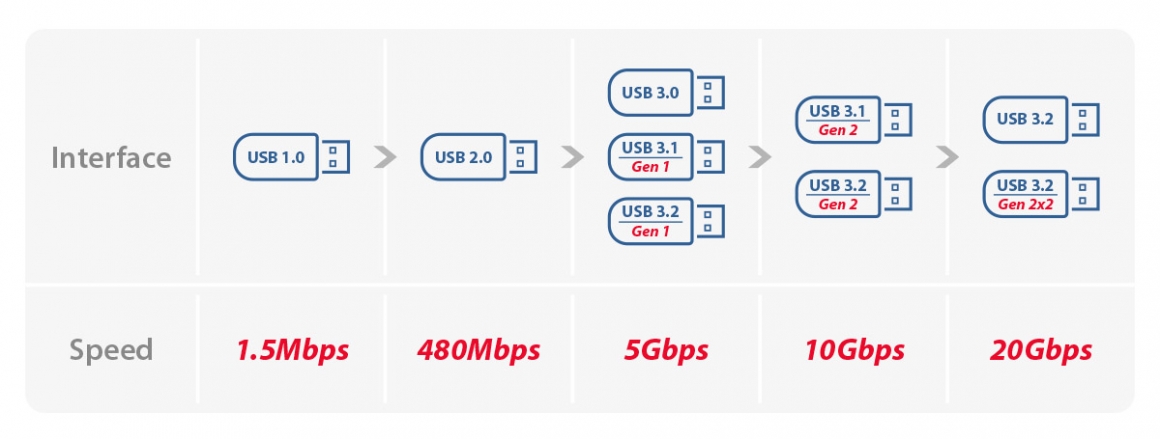
Normally, faster is better, and USB 3.0 is faster than USB 2.0, but when it comes to USB flash drives, paying for the additional speed may not be necessary. There’s little point in paying a premium for speed for a drive that’s only transferring and carrying 32GB of data. The speed jump is negligible at that size unless you have a time-sensitive job that has you using the drive multiple times a day. Now, if your flash drive holds 1TB of data, consider USB 3.0. In that case, make sure your computer is also USB 3.0-compatible before you buy a drive with the same technology.
Interface specification
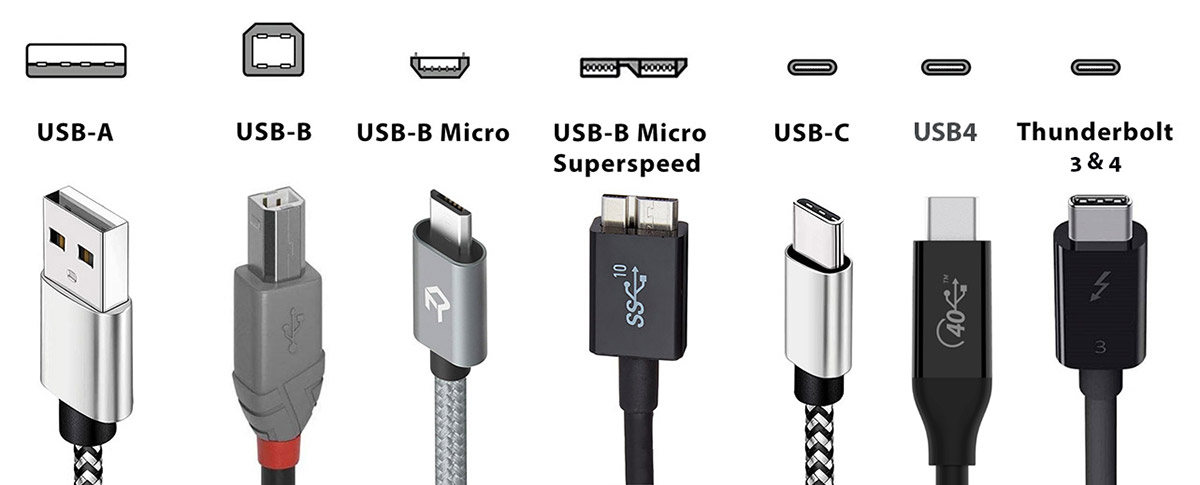
We can think of the connector specifications as nozzles. The nozzles have different pipe diameters, so you have to find a faucet that can be used to connect it accurately. Each USB generation also has specific connector specifications, the most commonly used are USB Type-A and USB Type-C. We need to pay special attention to the connector of the PC when choosing a device to avoid the tragedy of not being able to plug it in due to buying the wrong connector. I myself made a foolish mistake once. I bought a Micro-B OTG flash drive without paying attention, but the connector of my smartphone was Type-C, so it was totally unusable. I went back to the store for replacement on the same day and the whole thing was very tiring.
Here’s a table to let you see at a glance what kind of connectors are available for each generation:
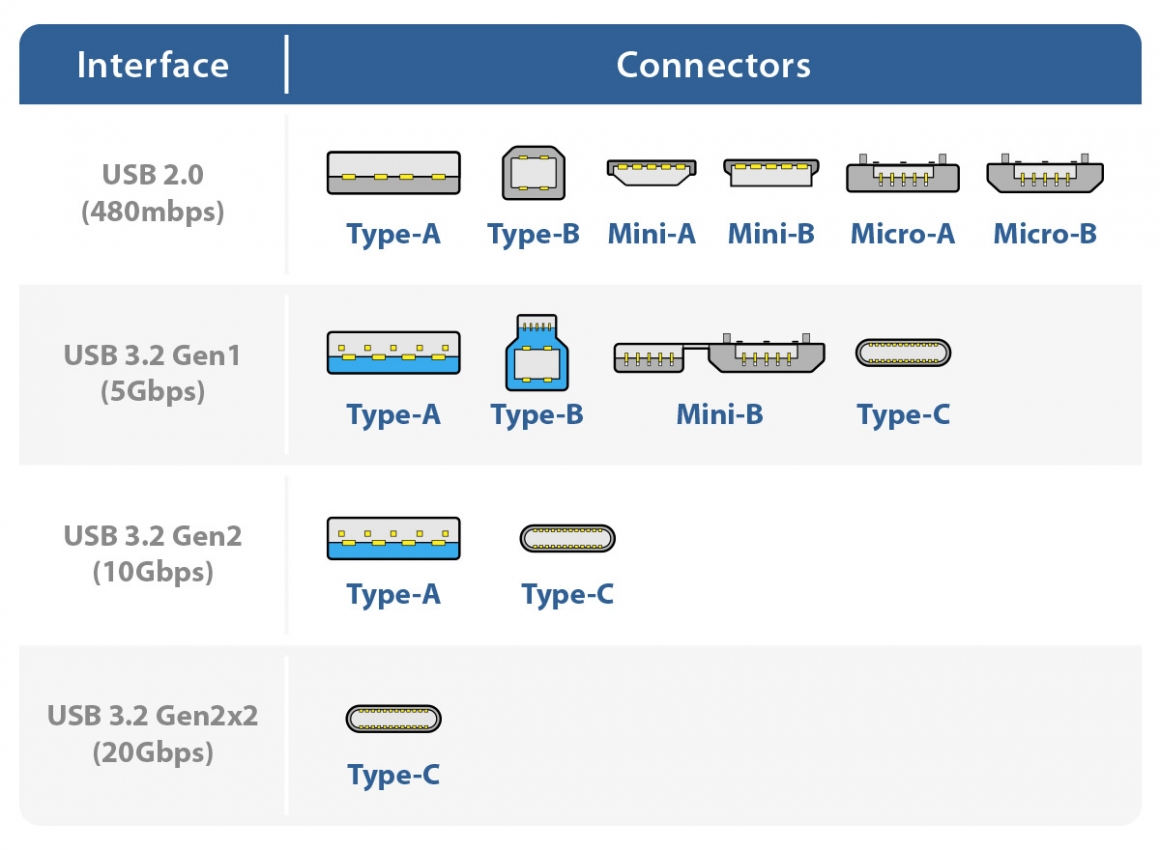
Interface and speed: We mentioned nozzles earlier, in fact, the interface bandwidth is like a water pipe, and the transfer speed of the device is like the water flowing in the water pipe. You have to provide a water pipe with a large diameter and match it with a nozzle that also has a large diameter to get a large amount of water. Let me show you a few different scenarios to help you understand:
- Large diameter water pipe + Large diameter nozzle = Large amount of water
- Large diameter water pipe + small diameter nozzle = small amount of water
- Small diameter water pipe + large diameter nozzle = small amount of water
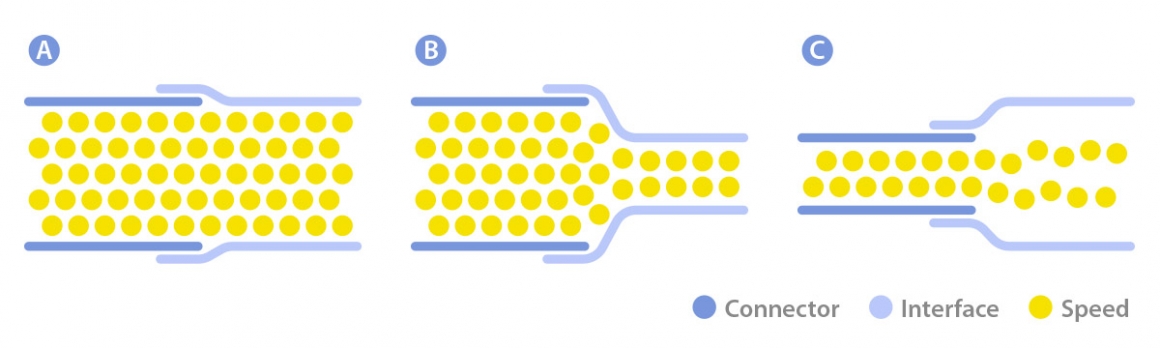
Therefore, we know that buying a high-speed product with USB3.2 Gen2x2 interface and plugging it directly into the Type-C connector is not going to give you the fastest transfer speed! There is no way to achieve full performance without a correct device interface.
I hope this article can help you when choosing a USB flash drive or an external USB hard drive. You have to consider these key points correctly, in order to avoid encountering problems like wrong connector or low transfer speed.
Buy Sturdy
No amount of password protection is going to help you if your flash drive falls apart after a little wear and tear. Look for drives made with anodized aluminum outer casings or some other kind of hardy material. If you go with plastic, at least make sure that any caps feature a tether. Waterproofing can’t hurt, especially if you’re planning to attach it to your keychain.
Always for to Authorized Dealer/Store
Actually, there are some points you need to keep in mind besides the above elements you. Even though you follow the given instructions, you may still cannot buy an ideal USB flash drive. Firstly, the quality of different brands is various, so a great way is to buy a drive with great reputation.
As there are numerous counterfeit USB flash drives on the market, you’d better buy it in an official flagship store or a physical store. Alternatively, buy the USB flash drive in legal shopping platform such as Amazon, eBay.
Format your USB
Before using your USB 1st time, always format it properly with your operqating system.