



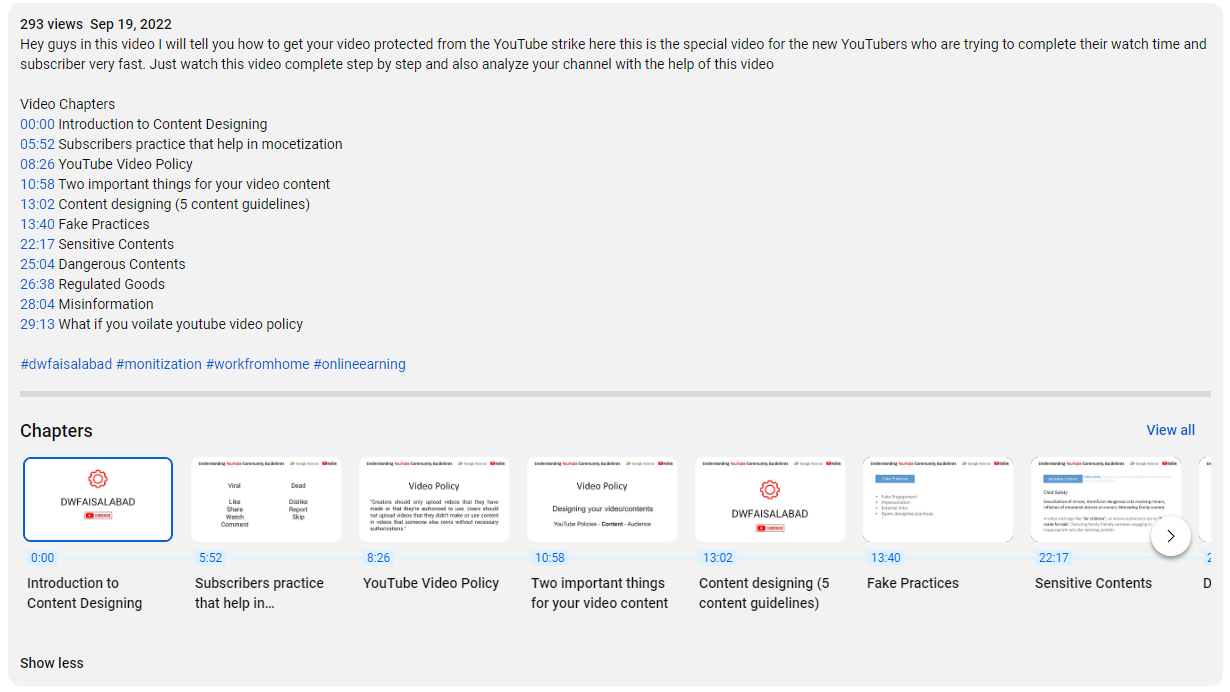
Chapters break up your YouTube video into sections, each with an individual preview. These chapters can help viewers by giving more info and context by allowing them to rewatch different parts of the video. Video Chapters are automatically generated based on timestamps you enter in the video description and will show in the video progress bar (aka the “video scrubber bar”) below your video.
- You can add chapters to your YouTube video by adding timestamps for each chapter in the description.
- Adding chapters makes YouTube videos easier for viewers to watch and find their favorite moments.
- YouTube will also occasionally give your videos chapters automatically, if you enable the option.
How to Add Chapters to YouTube Videos
Let’s discuss how you can easily add chapters to your YouTube videos. There are 2 main ways to do this:
- Manually, by adding timestamps in the video’s description.
- Let YouTube automatically create chapters of your videos via the Automatic chapters function in the YouTube Studio.
Add Chapters to YouTube Videos Manually
To manually add chapters to your YouTube videos is fairly straightforward and doesn’t require a lot of work.
But before thinking of how to add these chapters, you first need an idea of at which time intervals all the chapters in your video will begin and end.
Creating chapters for a YouTube video is easy! You just need to enter the timestamps in the video description. The detailed steps are as follows.
Step 2 Upload a new video, or find an existing video you want to add chapter to and hit Edit Video icon.
Step 3 Go to Description > Add Details. Add a list of timestamps and titles.
The timestamps should start with the starting time of the video clip and the title. For example:
0:00 Intro
0:30 Part 1. What Is Video Clip Chapter
1:20 Part 2. Why You Need to Add Chapter to YouTube Video
2:30 Part 3. How to Add Chapter to YouTube Video
3:50 Part 4. Like & Subscribe
This format works for videos that are less than 10 minutes. If your video is between 10 minutes to 60 minutes, please start the first chapter with 00:00 instead of 0:00. For videos that are longer than 1 hour, the right format is 00:00:00.


You can use spacing to separate the time and the chapter content. Dashes also work.
Add Chapters Using YouTube’s Automatic Chapters Functionality
YouTube’s automatic chapters feature uses machine learning to automatically add video chapters by analyzing pauses, transcripts, overlays, and transitions.
This is advantageous because then creators don’t have to manually create chapters and it also means that YouTube is able to improve its understanding of your content.
By default, automatic chapters are activated for all new video uploads if eligible. This feature won’t be available for channels that have any active strikes against them or if the content is deemed to be inappropriate for some audiences.
If you’ve got video content that was published before automatic chapters were introduced by YouTube, then follow these steps to add this function.
Go to your YouTube Studio account and click on the Content tab. Click the pencil icon on the video of your choice and scroll down to the Automatic chapters section.
Click the box that says Allow automatic chapters (when available and eligible).


If you want to remove automatic chapters for a specific video, you can do that by unchecking this option.
YouTube Chapters Not Working?
There can be several reasons why YouTube chapters might not work for your video. Reasons can be
- You haven’t added a 00:00 timestamp
- You have added less than 3 chapters
- One of your chapters has less than 10 seconds
- The timestamps are not listed in chronological order
- You may have entered timecodes with . instead of :
- Your channel has active copyright strikes
- Your channel has less than 1k subscribers
- Your video content could be potentially inappropriate to some viewers

Benefits of Video Chapters
MORE ENGAGING
It is in your best interest to add chapters to your YouTube videos because doing so makes them more engaging and draws in more viewers. Not all viewers have a longer time to spend on your video to watch others are only spotting essential segments or chapters to your video.
Easy to find crucial information
Creators can choose to manually add video chapters or use automatic video chapters for each submitted video. It is preferable to manually add chapters to your YouTube videos if you want precise timing and description levels.
The use of chapters makes it easier for viewers to find the information they want. Nobody enjoys searching through a 20-minute video for a single two-minute portion.
Boost SEO
Video chapters may also help with SEO and make videos easier to find through search engines.
Videos with shorter run times and a stronger focus on entertainment don’t always need chapters. This includes less business-focused content like movies, music videos, and comedy bits, as well as things like brand promo videos or brief explanatory videos.
Simple to Watch
With the use of video chapters, a video is divided into smaller, distinct segments. Each segment is given more context and information by the chapter breaks, which also make it simple to watch the video again.
Besides manually uploading a time stamped video, YouTube can now automatically caption Video Chapters on your new and old videos thanks to a platform change. Videos without timestamps provided by the uploader are currently being automatically activated by YouTube as Video Chapters.
