Backlinks in SEO

A backlinks is one of the most used words in the world of search engine optimization (SEO). Many bloggers who have only recently started a blog or a website often struggle to understand what the term “backlink” means. In this post, I hope to offer you an understanding of what backlinks are, why they are essential to SEO, and […]

How to Disable Self Pingbacks in WordPress

Linking to your own posts also known as interlinking is great for SEO. However with pingbacks enabled on your site, interlinking posts can become annoying because WordPress automatically creates new pingback for that post. These pingback appear in the comments section of your posts. While some users may like this feature, many users don’t find […]

How to Display Breadcrumb Navigation Links in WordPress

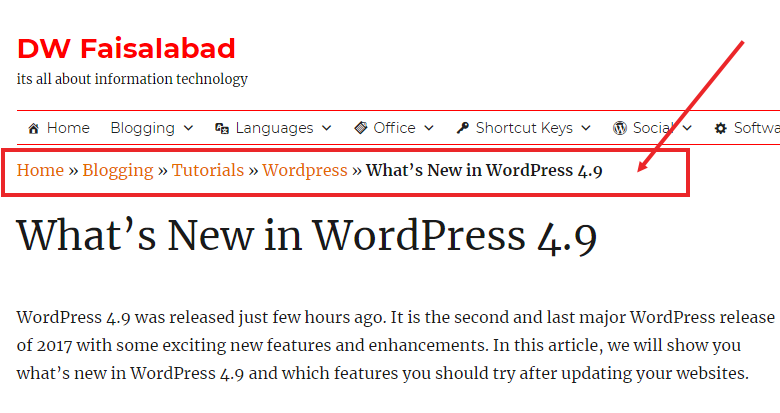
Do you want to display breadcrumb navigation links in your WordPress site? Breadcrumb navigation is a secondary navigation system that tell users where they are on a website relative to the homepage. In this article, we will show you how to display breadcrumb navigation links in WordPress. What is Breadcrumb Navigation and Why You Need […]

Urdu Fonts

Download Popular Urdu Fonts I have a collection 0f near about 500 popular Urdu fonts and want to share with everyone. These nice fonts are Some Popular Fonts Jameel Noori Nastaleeq Jameel Noori Nastaleeq Kasheeda Nafees Naskh Nafees Nastaleeq NafeesWeb Nasq Alvi Nastaleeq Attari Salees and many more Size: 91.6 MB Download Urdu Fonts

What’s New in WordPress 4.9 by DW faisalabad

What’s New in WordPress 4.9

WordPress 4.9 was released just few hours ago. It is the second and last major WordPress release of 2017 with some exciting new features and enhancements. In this article, we will show you what’s new in WordPress 4.9 and which features you should try after updating your websites. 4.9 is a major WordPress release, and […]

How to Properly Add JavaScripts and Styles in WordPress

Do you want to learn how to properly add JavaScripts and CSS stylesheets in WordPress? Many DIY users often make the mistake of directly calling their scripts and stylesheets in plugins and themes. In this article, we will show you how to properly add JavaScripts and stylesheet in WordPress. This will be particularly useful for […]

How to add Widget to Pages and Posts in WordPress

Widgets are very powerful and are extremely easy to use. However their usage is  limited to the widget ready areas.   What if you want to embed widget in a Page or Post?

In this post I will cover a plugin which allows you to embed any widget in a Page or Post. The plugin  AMR Shortcode Widget. Its a very popular plugin with 4.9 rating and has over 100,000 downloads.  Here are the instructions to use it. Read more about How to add Widget to Pages and Posts in WordPress …

How to Add Keywords and Meta Descriptions in WordPress

Do you want to properly add keywords and meta descriptions in WordPress? Meta keywords and meta descriptions allow you to improve your website’s SEO. In this article, we will show you how to properly add meta keywords and meta descriptions in WordPress. Why Add Keywords and Meta Descriptions in WordPress? Keywords and descriptions allow you […]

Customise WhatsApp notifications

There might be certain contacts you want to know instantly if they are calling or messaging you. To make sure they don’t blend into the crowd, you can change their specific alert tones so you recognise when that particular person has sent you a message or is WhatsApp calling you. iOS & Android: Chats > […]

Find out how long you’ve been ignored for in whatsapp.

There is nothing more annoying than seeing those blue ticks appear without a reply following soon after. If you want to torture yourself a little more and find out when your message was actually read and how long you’ve been ignored for, you can. We don’t advise it though. iOS: Chats > Specific chat > […]

Send a public message privately in whatsapp.

how to Send a public message privately in whatsapp. Ever had a free evening and wanted to ask several of your friends if they are around without having to open up each chat to ask them seperately? You can send a broadcast message to a list of contacts with it appearing as though you’ve asked […]

Bookmark important messages in whatsapp

Some messages are more important than others. Whether it’s a date you need to remember, or a good restaurant you’ve been recommended. It’s possible to bookmark these messages and find them all easily in the Starred Messages section. iOS: Chats > Specific chat > Specific message > Double tap or hold down and press the […]

Get shortcuts to specific conversations in Whatsapp

How to Get shortcuts to specific conversations Do you have a few extra special people you talk to all the time via WhatsApp? We do too. You can create a shortcut for specific conversations on Android, making it easier to access those chats you need all the time. Android: Chats > Specific chat > Menu […]

Hide your profile picture in Whatsapp

Hide your profile pictureYou might not want everyone to see your profile picture, especially if you’re part of several groups where you don’t know everyone in the group. perhaps you just fancy being a little mysterious for the day. Either way, you can choose if everyone, no-one, or only your contacts see your picture. iOS […]

Stop people seeing your messages in Whatsapp

Ever passed your phone to a friend and instantly panicked about the messages they might see come through? Yeah, we haven’t either. For those that have, you can turn off message preview on iOS so only the contact’s name will appear, rather than their life story. In Android, it’s not possible through the WhatsApp app […]

Save your data allowance

Save your data allowance If you’ve got a limited data allowance, you don’t want WhatsApp munching it all away. Thankfully, you can customise when media is allowed to download, as well as ensure calls use as little data as possible. iOS and Android: Settings > Data Usage .

Mark chats as unread in Whatsapp

Ever been out and about, read a chat and then completely forgot to reply? We do it all the time. There is a way to mark important chats with dot to remind you to go back to it though. iOS: Chats > Swipe left to right > Mark as Unread Android: Long press chat > […]

Find who you talk to most – Whatsapp

Who is really your favourite person? It might not be who you think. On iOS, there is a way to find the people you send the most messages to and how much storage each person takes up, among other things. iOS: Settings > Account > Storage Usage > Select Contact.