

COMPUTE v2 = RANGE(V1,2,4).
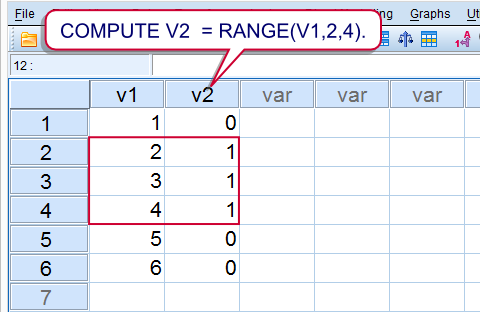 SPSS RANGE Function Result
Summary
SPSS’ RANGE function is used to evaluate whether or not values are within a given range. Test values equal to the lower or upper boundary are also within the given range. Run the syntax below for a quick demonstration.
SPSS Range Syntax Example
data list free/v1(f1).
begin data
1 2 3 4 5 6
end data.*2. Check whether value on v2 is between 2 and 4.
compute v2 = range(v1,2,4).
exe.
Notes
RANGE takes three arguments. So in RANGE(A,B,C)
Arefers to the test value;Brefers to the lower boundary;Crefers to the upper boundary;A,BandCcan all be values within variables or constants (over cases). The most common scenario, however, is thatAis a variable andBandCconstants.
RANGE may return three values:
- 1 (or “True”) if the test value is within the range;
- 0 (or “False”) if the test value is not within the range;
- A system missing value if the range can’t be evaluated due to missing values.
SPSS Range with Dates and Times
SPSS RANGE can be readily used with date variables and time variables. It should be kept in mind that SPSS dates and times are expressed in numbers of seconds. This implies that you should convert “normal” date and time values into numbers of seconds too. This can be done with the DATE.DMY and TIME.HMS functions as shown in the syntax below.
SPSS Range Syntax Example
data list free/arrival(time10).
begin data
10:32:12 12:59:43 16:34:36 17:20:50 18:41:23 23:48:03
end data.*2. Flag arrivals between noon and 6 PM.
compute arrival_during_afternoon = range(arrival,time.hms(12,0,0),time.hms(18)).
exe.
SPSS Range with Strings
Technically, you can use RANGE for string values too. SPSS basically uses an alphabetical order to determine whether string values are in a given range or not. This can be seen by running SORT CASES as in the syntax example below.
SPSS Range Syntax Example
data list free/v1(a2).
begin data
a b c C cc d D EE e f
end data.*2. Sort cases.
sort cases by v1.*3. Flag values between ‘C’ and ‘e’.
compute v2 = range(v1,’C’,’e’).
exe.

