

Rounded Images
Use the border-radius property to create rounded images:
 |
 |
Example
|
Example
|
Thumbnail Images
Use the border property to create thumbnail images.
Example
img {
border: 1px solid #ddd;
border-radius: 4px;
padding: 5px;
width: 150px;
}
<img src=”paris.jpg” alt=”Paris”>
Example
img {
border: 1px solid #ddd;
border-radius: 4px;
padding: 5px;
width: 150px;
}
img:hover {
box-shadow: 0 0 2px 1px rgba(0, 140, 186, 0.5);
}
<a href=”paris.jpg”>
<img src=”paris.jpg” alt=”Paris”>
</a>

img {
max-width: 100%;
height: auto;
}
img {
display: block;
margin: auto;
width: 50%;
}
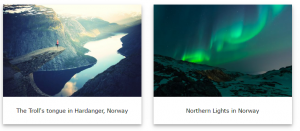
div.polaroid {
width: 80%;
background-color: white;
box-shadow: 0 4px 8px 0 rgba(0, 0, 0, 0.2), 0 6px 20px 0 rgba(0, 0, 0, 0.19);
}
img {width: 100%}
div.container {
text-align: center;
padding: 10px 20px;
}
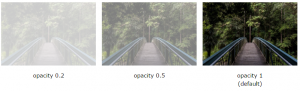
img {
opacity: 0.5;
filter: alpha(opacity=50); /* For IE8 and earlier */
}
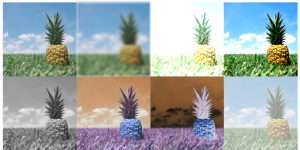
img {
-webkit-filter: grayscale(100%); /* Safari 6.0 – 9.0 */
filter: grayscale(100%);
}
.responsive {
padding: 0 6px;
float: left;
width: 24.99999%;
}
@media only screen and (max-width: 700px){
.responsive {
width: 49.99999%;
margin: 6px 0;
}
}
@media only screen and (max-width: 500px){
.responsive {
width: 100%;
}
}
// Get the modal
var modal = document.getElementById(‘myModal’);
// Get the image and insert it inside the modal – use its “alt” text as a caption
var img = document.getElementById(‘myImg’);
var modalImg = document.getElementById(“img01”);
var captionText = document.getElementById(“caption”);
img.onclick = function(){
modal.style.display = “block”;
modalImg.src = this.src;
captionText.innerHTML = this.alt;
}
// Get the <span> element that closes the modal
var span = document.getElementsByClassName(“close”)[0];
// When the user clicks on <span> (x), close the modal
span.onclick = function() {
modal.style.display = “none”;
}


