

It is possible to style HTML elements that have specific attributes or attribute values.
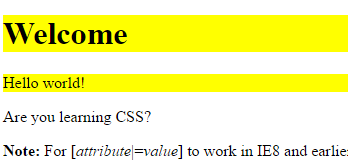
CSS [attribute] Selector
The [attribute] selector is used to select elements with a specified attribute.
The following example selects all <a> elements with a target attribute:
Example
a[target] {
background-color: yellow;
}
CSS [attribute=”value”] Selector
The [attribute=”value”] selector is used to select elements with a specified attribute and value.
The following example selects all <a> elements with a target=”_blank” attribute:
Example
a[target=”_blank”] {
background-color: yellow;
}
CSS [attribute~=”value”] Selector
The [attribute~=”value”] selector is used to select elements with an attribute value containing a specified word.
The following example selects all elements with a title attribute that contains a space-separated list of words, one of which is “flower”:
Example
[title~=”flower”] {
border: 5px solid yellow;
}
The example above will match elements with title=”flower”, title=”summer flower”, and title=”flower new”, but not title=”my-flower” or title=”flowers”.
CSS [attribute|=”value”] Selector
The [attribute|=”value”] selector is used to select elements with the specified attribute starting with the specified value.
The following example selects all elements with a class attribute value that begins with “top”:
Note: The value has to be a whole word, either alone, like class=”top”, or followed by a hyphen( – ), like class=”top-text”!
Example
[class|=”top”] {
background: yellow;
}
CSS [attribute^=”value”] Selector
The [attribute^=”value”] selector is used to select elements whose attribute value begins with a specified value.
The following example selects all elements with a class attribute value that begins with “top”:
Note: The value does not have to be a whole word!
Example
[class^=”top”] {
background: yellow;
}
CSS [attribute$=”value”] Selector
The [attribute$=”value”] selector is used to select elements whose attribute value ends with a specified value.
The following example selects all elements with a class attribute value that ends with “test”:
Note: The value does not have to be a whole word!
Example
[class$=”test”] {
background: yellow;
}
CSS [attribute*=”value”] Selector
The [attribute*=”value”] selector is used to select elements whose attribute value contains a specified value.
The following example selects all elements with a class attribute value that contains “te”:
Note: The value does not have to be a whole word!
Example
[class*=”te”] {
background: yellow;
}
Styling Forms
The attribute selectors can be useful for styling forms without class or ID:
Example
input[type=”text”] {
width: 150px;
display: block;
margin-bottom: 10px;
background-color: yellow;
}
input[type=”button”] {
width: 120px;
margin-left: 35px;
display: block;
}
Tip: Visit our CSS Forms Tutorial for more examples on how to style forms with CSS.

