

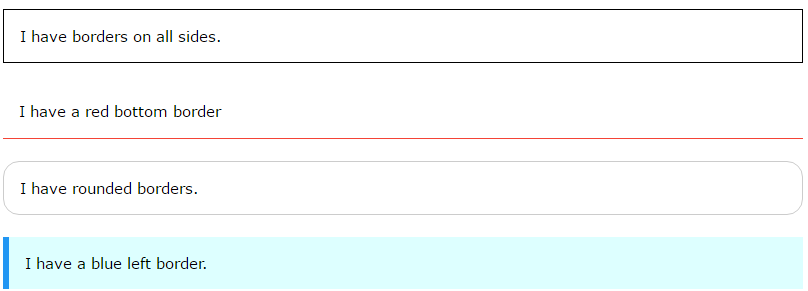
Border Style
The border-style property specifies what kind of border to display.
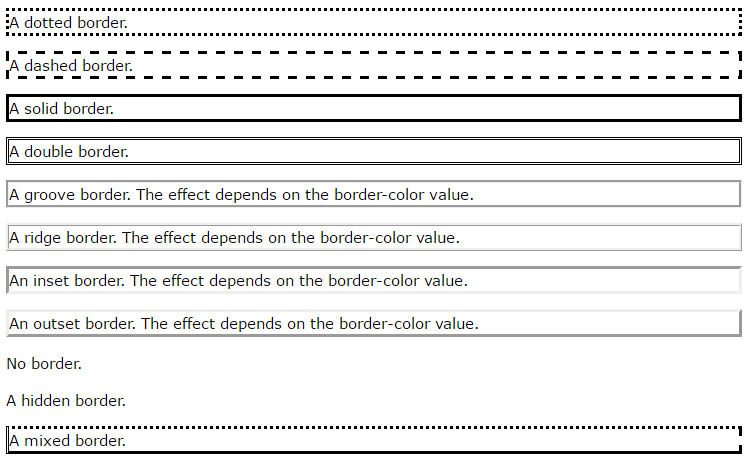
The following values are allowed:
- dotted – Defines a dotted border
- dashed – Defines a dashed border
- solid – Defines a solid border
- double – Defines a double border
- groove – Defines a 3D grooved border. The effect depends on the border-color value
- ridge – Defines a 3D ridged border. The effect depends on the border-color value
- inset – Defines a 3D inset border. The effect depends on the border-color value
- outset – Defines a 3D outset border. The effect depends on the border-color value
- none – Defines no border
- hidden – Defines a hidden border
The border-style property can have from one to four values (for the top border, right border, bottom border, and the left border).
Example
p.dotted {border-style: dotted;}
p.dashed {border-style: dashed;}
p.solid {border-style: solid;}
p.double {border-style: double;}
p.groove {border-style: groove;}
p.ridge {border-style: ridge;}
p.inset {border-style: inset;}
p.outset {border-style: outset;}
p.none {border-style: none;}
p.hidden {border-style: hidden;}
p.mix {border-style: dotted dashed solid double;}

Border Width
The border-width property specifies the width of the four borders.
The width can be set as a specific size (in px, pt, cm, em, etc) or by using one of the three pre-defined values: thin, medium, or thick.
The border-width property can have from one to four values (for the top border, right border, bottom border, and the left border).

Example
p.one {
border-style: solid;
border-width: 5px;
}
p.two {
border-style: solid;
border-width: medium;
}
p.three {
border-style: solid;
border-width: 2px 10px 4px 20px;
}
Border Color
The border-color property is used to set the color of the four borders.
The color can be set by:
- name – specify a color name, like “red”
- Hex – specify a hex value, like “#ff0000”
- RGB – specify a RGB value, like “rgb(255,0,0)”
- transparent
The border-color property can have from one to four values (for the top border, right border, bottom border, and the left border).
If border-color is not set, it inherits the color of the element.

Example
p.one {
border-style: solid;
border-color: red;
}
p.two {
border-style: solid;
border-color: green;
}
p.three {
border-style: solid;
border-color: red green blue yellow;
}
Border – Individual Sides
From the examples above you have seen that it is possible to specify a different border for each side.
In CSS, there are also properties for specifying each of the borders (top, right, bottom, and left):

Example
p {
border-top-style: dotted;
border-right-style: solid;
border-bottom-style: dotted;
border-left-style: solid;
}
The example above gives the same result as this:
Example
p {
border-style: dotted solid;
}
So, here is how it works:
If the border-style property has four values:
border-style: dotted solid double dashed;
- top border is dotted
- right border is solid
- bottom border is double
- left border is dashed
If the border-style property has three values:
border-style: dotted solid double;
- top border is dotted
- right and left borders are solid
- bottom border is double
If the border-style property has two values:
border-style: dotted solid;
- top and bottom borders are dotted
- right and left borders are solid
If the border-style property has one value:
border-style: dotted;
- all four borders are dotted
The border-style property is used in the example above. However, it also works with border-width and border-color.
Border – Shorthand Property
As you can see from the examples above, there are many properties to consider when dealing with borders.
To shorten the code, it is also possible to specify all the individual border properties in one property.
The border property is a shorthand property for the following individual border properties:
- border-width
- border-style (required)
- border-color
Example
p {
border: 5px solid red;
}
Result:

You can also specify all the individual border properties for just one side:
Left Border
p {
border-left: 6px solid red;
background-color: lightgrey;
}
Result:

Bottom Border
p {
border-bottom: 6px solid red;
background-color: lightgrey;
}
Result:

Rounded Borders
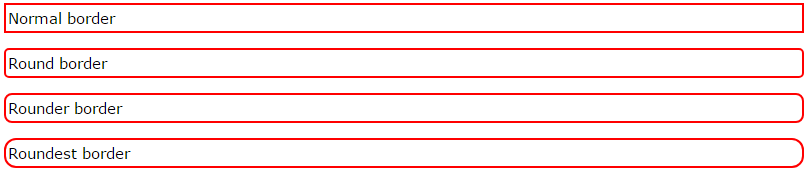
The border-radius property is used to add rounded borders to an element:
Example
p {
border: 2px solid red;
border-radius: 5px;
}
Note: The border-radius property is not supported in IE8 and earlier versions.
All CSS Border Properties
|
Property
|
Description
|
|---|---|
| border | Sets all the border properties in one declaration |
| border-bottom | Sets all the bottom border properties in one declaration |
| border-bottom-color | Sets the color of the bottom border |
| border-bottom-style | Sets the style of the bottom border |
| border-bottom-width | Sets the width of the bottom border |
| border-color | Sets the color of the four borders |
| border-left | Sets all the left border properties in one declaration |
| border-left-color | Sets the color of the left border |
| border-left-style | Sets the style of the left border |
| border-left-width | Sets the width of the left border |
| border-radius | Sets all the four border-*-radius properties for rounded corners |
| border-right | Sets all the right border properties in one declaration |
| border-right-color | Sets the color of the right border |
| border-right-style | Sets the style of the right border |
| border-right-width | Sets the width of the right border |
| border-style | Sets the style of the four borders |
| border-top | Sets all the top border properties in one declaration |
| border-top-color | Sets the color of the top border |
| border-top-style | Sets the style of the top border |
| border-top-width | Sets the width of the top border |
| border-width | Sets the width of the four borders |

