If you are working in a marketing and sales firm, then you know the importance of WhatsApp. You can make your firms Group and interact with customers & users in one go.
On WhatsApp Group there may be so many people whom you don’t know. So for any reason, if you want to get the contact details of every member of any WhatsApp Group, then how you can get it? Is there any other way instead of manually saving members contact details? YES, In this article you will get two best solutions using which you can extract all WhatsApp Group Contacts in one go. Let’s see how to do.
Extract All WhatsApp Group Contacts
WhatsApp does not give you an option to download contacts of any Group, but by doing some geeks in Browser with the help of WhatsApp Web feature & using an awesome Google Chrome Extension, we can extract all WhatsApp Group contacts in one Excel file. Let’s check out both methods one by one.
1. Doing Some Geeks in Browser
As we all know, WhatsApp can be used on any platform from Windows to Mac, Android to iPhone, Read Here. WhatsApp Web Feature allows you to open WhatsApp in your computer browser. We will gonna exploit this feature to extract all WhatsApp Group Contacts. Just follow the step-by-step guide given below:
Step 1: Open Your WhatsApp in your Computer Browser. if you don’t know how to do-Read Here.
Step 2: On the Left column, you will get all the current chats, just go to any Group whose contacts you want to extract.
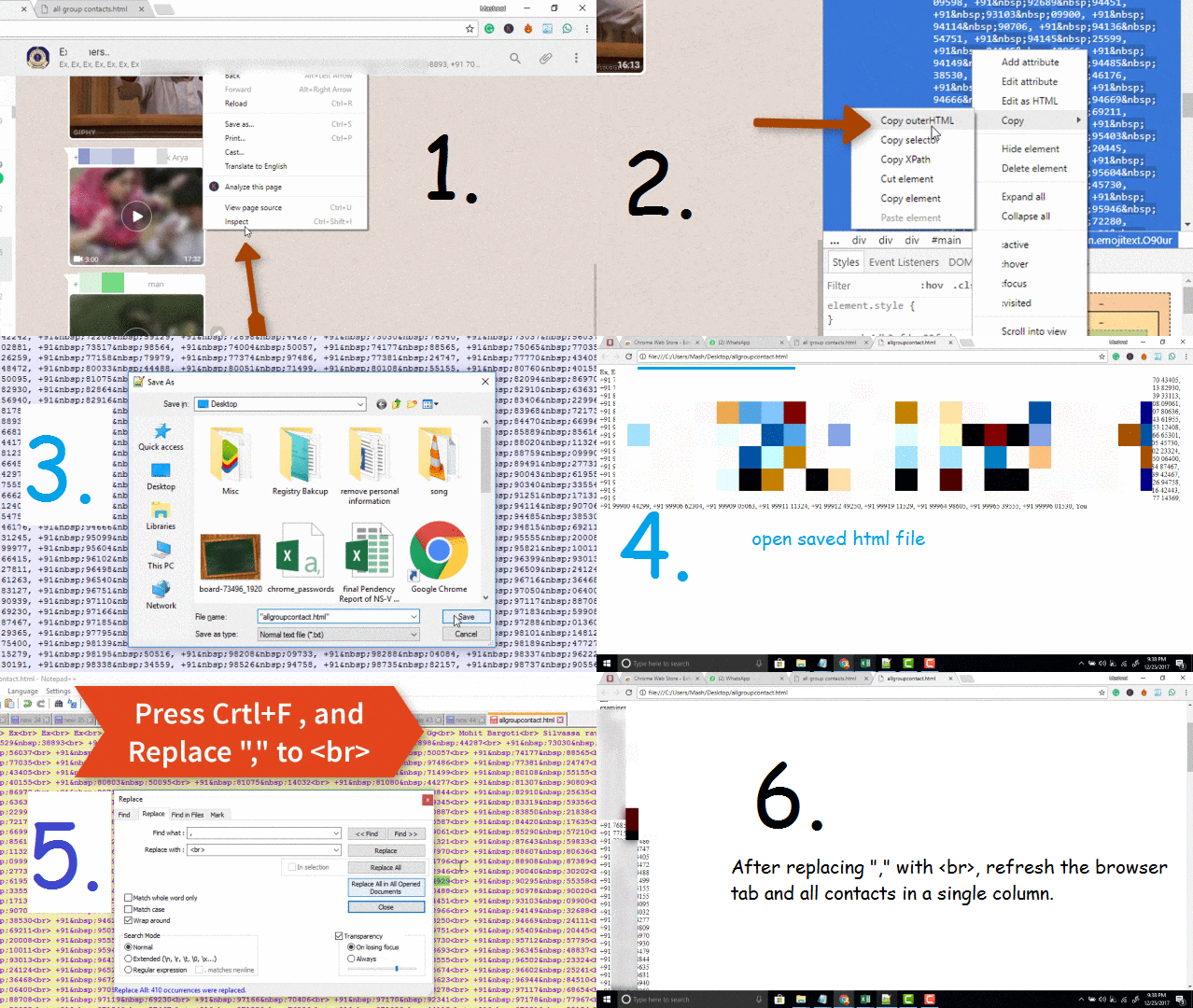
Step 3: On the Right column, WhatsApp group will get opened. Just below of WhatsApp Group Name, you can see some contacts. Right-click here and choose “Inspect“.
Step 4: Browser developer tool window will get opened. In the ‘Inspect‘ tab, it will highlight the area consisting of “all contacts“. Just right-click on this area –> Select Copy –> Copy outerhtml.
Step 5: Now open any web HTML editor such as Adobe Dreamweaver, Notepad++ OR Simply use Notepad. Create a new file & paste all the data and save this file with ‘.html’ extension at your computer desktop or anywhere you want.
Step 6: Open this saved file in your computer browser. you can see all contact numbers but not easy to save it. So, in that file, just change “,” to <br> [ comma to brake line] and save it. Just refresh in your browser and all the number in one column.
Now you can easily maintain in Excel File. In this fashion, you can extract or download all Contacts of any WhatsApp Group.
2. Google Chrome Extension: ‘Download WhatsApp Group PhoneNumber’
‘Download WhatsApp Group PhoneNumber‘ app allows you to download all contacts in one go. This little chrome extension makes our work easier. Let’s see how to use it:
Step 1: Open WhatsApp in your Computer Browser. Add ‘Download WhatsApp Group PhoneNumber‘ extension in your Chrome Browser. One icon will get appear on the extreme right of the address bar.
Step 2: Now, click on this icon, it will open Whatsapp in a new Tab. Now again go to the Group whose contacts you want to download.
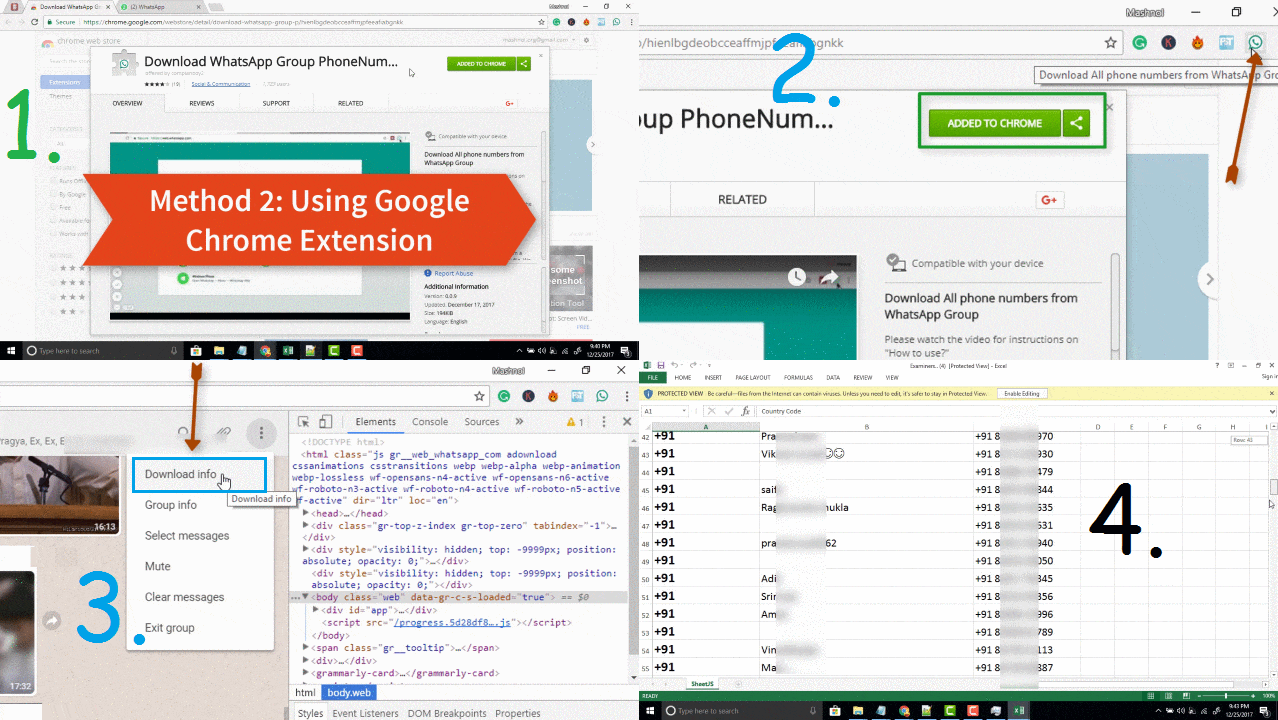
Step 3: Click on the 3 vertical dot – ‘Menu’ icon –> click on ‘Download Info’. YES, this option is added by this little chrome extension. It will download details of all Group Members such as ‘Contact Public Display Name’ and ‘Phone Number‘.