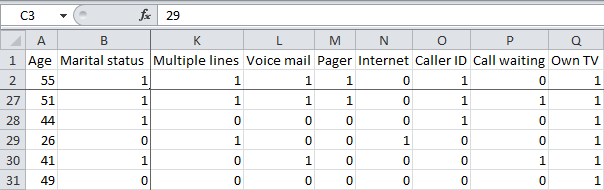
If you have a large amount of data in Excel worksheet and at the bottom of the data or data, you can not see the column heading, to see that you need to go to the top, MS office has solved this problem, it can be useful to freeze rows or columns.
This way you can keep rows or columns visible while scrolling through the rest of the worksheet.
Freeze Top Row
To freeze the top row, execute the following steps.
1. On the View tab, click Freeze Panes, Freeze Top Row.
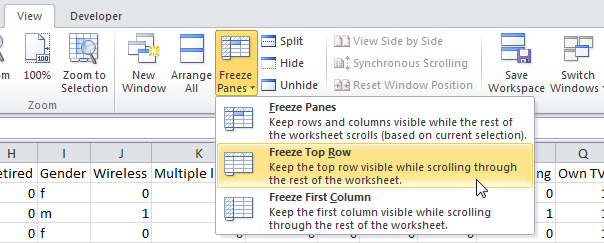
2. Scroll down to the rest of the worksheet.
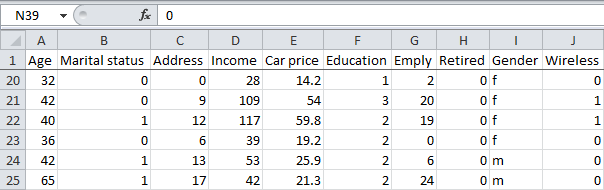
Result. Excel automatically adds a black horizontal line to indicate that the top row is frozen.
Note: to keep the first column visible while scrolling through the right of the worksheet, click Freeze First Column.
Unfreeze Panes
To unlock all rows and columns, execute the following steps.
1. On the View tab, click Freeze Panes, Unfreeze Panes.

Freeze Panes
To freeze panes, execute the following steps.
1. Select row 3.
2. On the View tab, click Freeze Panes, Freeze Panes.
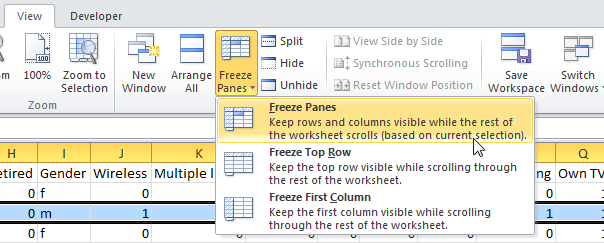
3. Scroll down to the rest of the worksheet.
Result. All rows above row 3 are frozen.
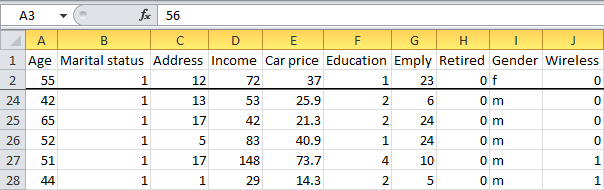
Note: to keep columns visible while scrolling to the right of the worksheet, select a column and click Freeze panes.
4. Select cell C3 (unfreeze panes first).
5. On the View tab, click Freeze Panes, Freeze Panes.
Result. The region above row 3 and to the left of column C is frozen.