Index Your New Website, This is most common question that we face from blogger and web managers these days. This article teaches you how to fix any of these three problems: Your entire website isn’t indexed or Some of your pages are indexed, but others aren’t or Your newly-published web pages aren’t getting indexed fast enough. Let’s discuss How to Get Google to Index Your New Website – Learn step by step.
But first to understand Google index, I will tell you a little introduction about Crawling and Indexing. Crawling and indexing are two such terms.
Google Crawling and Indexing.
Google discovers new web pages by crawling the web and then they add those pages to their index. They do this using a web spider called Googlebot. These are the two terms which describe the entire terminology of google search. Let’s understand crawling and indexing.
Google Crawling:
When Google visits your website for tracking purposes, This process is done by Google’s Spider crawler (Web Crawler). Crawling is a process of following hyperlinks on the web to discover new content. Basically, web crawlers is a software program which finds and retrieve the new pages and updates the google index. This software decide which websites to crawl and how many pages from a website to fetch.
Googlebot (web crawler) begins its crawling from the URL’s stored in the Google’s database fetched from the last crawl process and sitemap of a site which has been submitted priodically. Then, webcrawler visits each and every URL of the database. At the end Google web crawler prepare a sheet that defines what it visited and what new pages added and what changes has been made.
Factors That Affect Crawling: Domain Name, Backlinks, Internal Linking, XML Sitemap, Duplicate Content, URL Canonicalization, Meta Tags, Pinging
Google Indexing:
Once crawling gets completed there are hundreds of thousands of possible results for your search term, the results get put onto Google’s index (i.e. web search). The process of storing every web page in a vast database of google is call Indexing.
Now the question is How does google decide which document we really want? It looks web crawler to decide which pages to index. Google bots analyze that How many times does this page contain a keyword and Do the words appear in the title and in URL? Does the page include synonyms for search terms? Is this page from a quality website or is it low quality even spamming? What is the page’s PageRank? That’s the formula which rates the page’s importance by looking at how many outside links point to it & how important those links are? [5]
Google Crawling and Google Indexing are two main process that play a vital role in instant indexing. Now lets turn to Google process of how to Index your new website or blog.
Before starting your Google indexation process, How to check if your website is indexed on Google
Googel Indexing Process
How do I get Google to index my site using these SEO tools: Google Search Console & Yoast.
Its very complex to Index your new website as there are hundereds of software/plungins and other application that can help you to simplify the indexation process but today We will discuss only two which I think are enough for Better indexation;
Google Search Console
Google Search Console is a free tool that helps you monitor your site’s presence in Google’s process to Index Your New Website or blog (indexation) and search results. You can use it to make sure that Google can access your content, submit new content, and monitor and resolve any issues.
If you’re already familiar with this tool and also has sufficent know about how to use it, then skip above give link and jump to next section for nine tips that can help to improve your Google process to Index your new website or blog.
Yoast SEO
Yoast SEO is a free WordPress plugin designed to easily optimize sites for search. If you run a WordPress site, it’s one of the best tools you can use to improve your presence in search — and at this point, it’s basically considered an essential tool.
If you’re already familiar with this tool, skip above give link and jump to next section Google process to Index your new website or blog.
Indexation Process – How to index your new website
If your website or blog is still not indexed on google, then follow this process:
- Go to Google Search Console
- Go to URL Inspection option
- Paste the URL that you want to index search bar.
- Wait for Google to check the URL
- Click the Request indexing button
Keep doing this when you publish new page or post. This will tells Google that you made some changes in your blog or website. But it doen not mean that you are effectively doing right for indexation. There may be some issues and problem that you may face in your indexation process and its maintenance. Please follow the list below to fix the problem.
The following 9 will clear your concept of how Index Your New Website. [6]
- Create a Sitemap
- Submit your sitemap to Google Search Console
- Create a robots.txt
- Create internal links
- Earn inbound links
- Encourage social sharing
- Create a blog
- Block low quality pages
- Check for crawl errors
1. Create a Sitemap
As you can understand the word “Sitemap” means the map of the website. there are hundereds of tools to create sitemap of you site. This is a process of creating an XML format file. It’s a document in XML format that tells crawlers where they can and can’t go.
Web crawler is very active and intelligent but still it need any roadmap to go its direction as without a sitemap, web crawler (Googlebots) can take 24 hours to Index your new website or blog. By creating a suitable sitemap, you can cutoff this time to just a few minutes. Normally Google index your new website or blog or new page in less than an hour.
Creating site map is very easy as you can use any online website like www.xml-sitemaps.com to create or if you familiar with Yoast SEO and you are using this plugin, then it is not a rocket science for you. Its just far away from your few clicks. On the other hand if you are not using Yoast SEO, then there is another beautiful plugin to create sitemap of any complicated website, Just Install Google XML Sitemaps Generator Plugin and create sitemap easily.
Google XML Sitemaps Generator Plugin
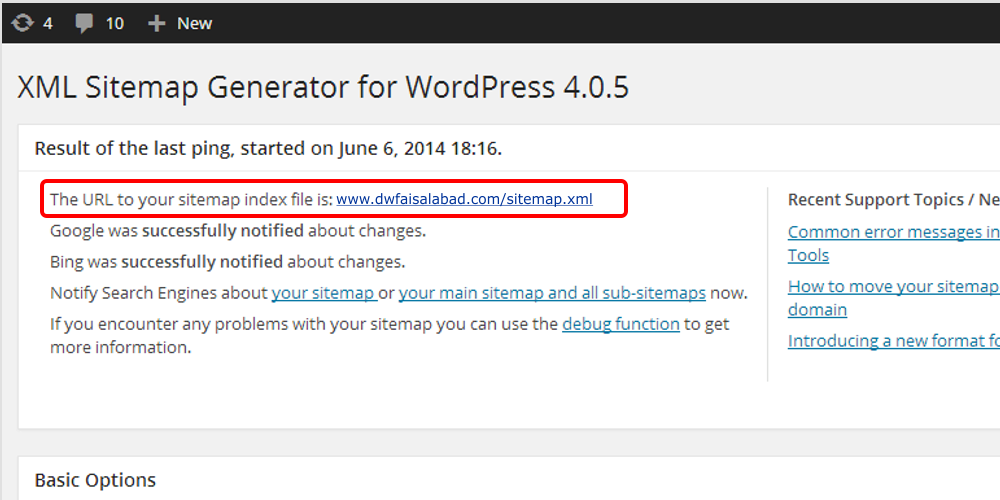
Once you have installed, it will create you webaite sitemap automatically, you can find your sitemap at the URL listed at the top of the page. In most cases, this will simply be http://yourdomain.com/sitemap.xml. In above picture you can see link in red box, just click and download XML file in you computer.
2. Submit your sitemap to Google Search Console
After creation of sitemap, now its time to submit it to different search engines like Google, yahoo, Bing etc. In this article we will discuss only Google search engin (Google Search Console) because this search console will let Google to know about the nature and content of the site that have been crawled by web spider (Googlebots).
Google is most powerful search engin these days.
- Sign in to Google Search Console.
- In the sidebar of the page, choose your website.
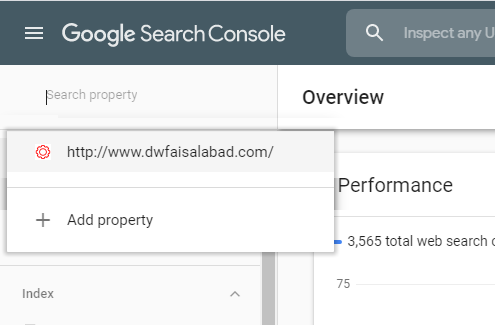
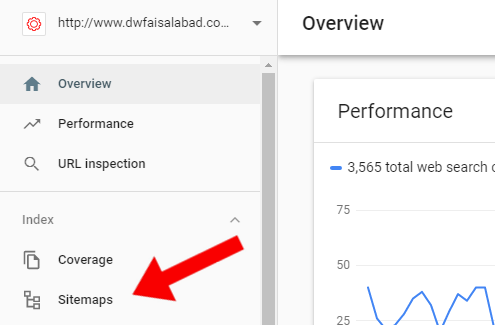
- Click on ‘Sitemaps’ tab.
The ‘Sitemaps’ option is located under the ‘Index’ section. If you dont see ‘Sitemaps’, click on ‘Index’ Arrow to expand the section.
- Remove prevevious and outdated or invalid sitemaps (if any) like sitemap.xml from Google Console
- Enter ‘sitemap_index.xml’ URL below in the ‘Add a new sitemap’ field to complete the sitemap URL.
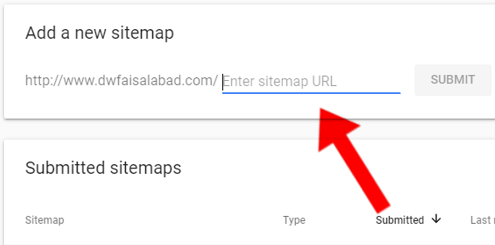
- Click Submit.
The sitemap should be processed immediately as it is entered in Google Search Console But it can take some time to crawl all the URLs listed in a sitemap, and it is possible that not all URLs in a sitemap will be crawled, it depends on the site size, activity, traffic, and so on.
It helpd the user to make sure that Google Search Engin has always an up-to-date version of your site.
3. Create a robots.txt
A robots.txt is simply plain text file that tells the Google Search Engines where they are allowed and where not allowed to go on a site.
Robots.txt wll not allow Google search Console to visit All those link or pages URL written in Robots.txt file. Robots.txt files are simple text-based files that makes it easy to create them in your computer’s default plain text editor like note pad. If you already have a robots.txt file then make sure you’ve deleted the text (but not the file).
To create your file, there are a few pieces you’ll need to know before creation of Robot.txt file;
- User-agent: the bot the following rule applies to
- Disallow: URL path you want to block
- Allow: URL path within a blocked parent directory that you want to unblock
If you want your entire website is open to being crawled, then, web robots will be directed to crawl your entire site. this: web robots will be directed to crawl your entire site.
User-agent: *
Disallow:
But now the question is “why would anyone want to block his site page to be indexed?” The short answer is that not every page on your site provides value to readers. For example, if your site runs on WordPress and it has lots of subfolders containing plugins and other information.
These files are important for you to help in managing site functions. So if you wanted to protect them from being crawled and indexed, your robots.txt file might look like this:
User-agent: *
Allow: /wp-content/uploads
Disallow: /wp-content/plugins
Disallow: /wp-content/readme. html
Disallowing certain pages helps crawlers focus on the content that you actually want indexed.
4. Create internal links
Internal links is another way to boost your organic traffic. Internal Link means while writing your post, Contextual linking to other pages on your own website or in simple words, Internal links means inserting Hyperlinks of other pages in your posts. See the following Picture where you can see different posts are linked to each other through internal links.
During crawling process, Webcrawler also index those pages of which you have inserted internal links in post. A well-organized website have maxixmun internal as well as atleast one external link that boost SEO power to google.
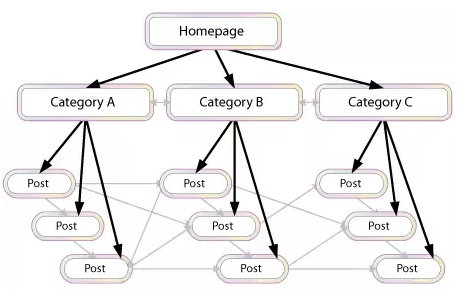
Site Structure has different from Internal Links technique. This teachnique makes your site more easier and flexible to use it. Site structing is also a good idea for internal linking to boost Google process to Index your new website. Site Structure helps Google ‘understand’ your site, prevents you from competing with yourself and It deals with changes on your website.
Internal Links or Contextual Internal link are basically the links in your context that refer user to another page of the same website but make sure that the page you are linking to context should be relavent to the content you are wrinting.
If you have a number of relavent pages then you can also create Hub Pages in your site.
These pages can be organized in many different ways, but essentially serve as indexes of your information on specific topics. the following are some best examples of Hub Pages.
- Related Posts
- Similar Posts
- Texanomy
- Category posts.
While inserting links to your webpagem keep in mind the your main focus should be your visitor not quantity of your material. If your visit is happy with your content, He/She can bookmark your page for future use or Email it to friends and family.
5. Earn inbound links/Backlinks
We know that internal links create a boost step towards Google indexation. On the other hand inbound links also provide assistance in Google indexation process. Google server also evaluates the links back to your website from quality sites. By creating valuable inbound links or backlinks, you can get recognition from the Google very fast.
Inbound Links or Backlinks is a Golden tool to create your audience free of cost.
The best way to get quality site to link back to your website is the creation of valuable, unique and informative content. The creation of the valuable inbound links are backlinks provide the valuable and original visitors to your website. Increase in the original visitor have a plus point to Index your new website or blog.
If you have created a strong backlinks on other websites, it means you have created a strong network that will get the original influencers towards your website.
If your website to receive more valuable backlink, it receives higher rank in Google search. To earn your inbound links from the high quality websites you need to focus on the following two things to do;
- High quality content
- A network of original supporters
Now the question is how can we generate inbound links for your website?
-
- Ask for specific links from your suppliers
Phone/email them and ask to visit your website. If your content is important to them, definately they will not reject to visit your requested page. - Comment on Other Blogs and Post In Public Forms
When you post or comment on another blog, you have the opportunity to include a link to your website. Do it.
- Get inbound links through content marketing
If you want to attract more customers, you should give something back to them. - Create infographics and publish them online
Its also a great way to get audience, Infographic content are very effective is you have something unique and special to share it your your visitors. - Use the power of Facebook, Instagram, twitter
Create your post on your website and share it on facebook, instagram and twitter. - Research your competitors
Also make a little search about your competator on Google and see how they are and where they are linking their website. - Get Listed in Relevant Quality Directories
Identify both free and paid directories in your area or industry that are high quality, trusted, authority sites and get listed.
- Get profile links
There are several website onwhich you can signup and create your own profile. there you can share everything about your business or website. - Sponsorship links
If you have a big budget in you pocket, then go for sponsership. You can Boost/advertise you business or website on facebook or on Google Ads. - Link out to other websites
Visit other sites, write your content introduction in comments or guest blog and leave your link there. - Generate internal links
Add a featured category on your main page of your website bring customer to your valuable products and articles. - Ask for reviews
In your content, Must ask your visitor to comment or review about content, I will make a bridge between you and visitor - Install social sharing widgets
Must install Social sharing button like facebook, twitter and etc. - Content syndication
Syndication is the process of having your content re-published on other websites, with credit given to your site.
- Ask for specific links from your suppliers
6. Encourage social sharing
Social Sharing is most powerful tool and strategy that most of the blogger are using these days to make their website viral. It encourages the new people to come to your website. Social Sharing plateform like Facebook plays a rival role in getting origal traffic for your site.
If we talk about Facebook, most of the blogger these days are sharing their content on their facebook pages. they are using same energy on facebook page as they do on their website. Copy your website Link and paste it on facebook, add a few words of text, your content is shared with whole of the world.
Original traffic by sharing on social media also activate Google Crawler (Web Spider) in crawling process that helps in Google indexation.
On the other hand there is another plateform that is much popular in Pakistan and India – Blogger has created their WhatsApp Groups and added their followers there. They share there content in their group on daily basis i.e. I personally met my friends who create 11 groups of whatsapp for jobs, He daily posts website links in their group that generates original traffic. Sharing your social pages also sends webspider to them, which can helps to boost the indexation process.
Create accounts on major social plateforms like facebook, twitter, linkedin, qoura and many others like these.
7. Create a blog
First of all, I will tell you what is different between blog and website. See below [1]
A Website’s Content is:
- Formal.
- Written with an intent to share information and not to involve in conversation.
- Written for business purposes.
- Wibsite Consist are less than a blog, normally.
- Website are updated on need base.
- Websites’ Contents Are Static (no change)
- Mainly written to promote product or services.
A Blog Content is:
- Ever-changing.
- Blogs Generate More Content than Websites.
- Blogs Consist Largely Of Articles.
- Blog are updated on daily basis.
- Discussion in involed with changing data.
- Blog’s Contents Are changeable when needed
- Written in conversation style, to attract readers and engage them in a discussion.
These days bloggers are creating tons of the material for searcher as compared to website holders, and on the other hand Google crawler knows that bloggers are creating new pages and updating their information day by day. Websites with a blog have an average of 434% more indexed pages. [2]
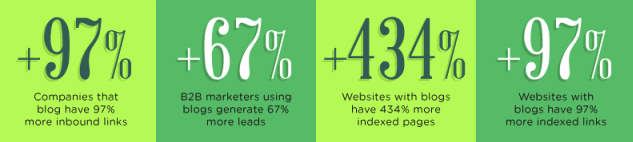
These companies also have 97% more inbound links and generate 67% more leads. if you have a website but dont have a blog, you should create it to speedup indaxation process which is our main priority to spread our website all around the world.
8. Block low quality pages
If you have created a high quality post like cornerston, then low quality content can be the barrier before your cornerston content. It is recomended that you should block all those content having low quality data for your visitors. Too many low quality contents can increase indexation process time and can also decrease indexes and ranks your site. So we recommend you to remove garbage from your site.
You Content that no value for its users should be:
- 301 redirected.
A 301 redirect is a status code that tells the visitors that your requested page or content has been moved from another new link. While using 301 redirect, it moves the user to new link, and makes sure that they are sent to the correct page. Users are redirected to a new page, which has replaced the old one. [3] - Set to NOINDEX. When the content page has values for your visitors, but not search engines, think thank you pages, paid landing pages, etc. All these pages should be set to NoIndex.
- Blocked via crawl through Robots.txt file. When the content page has values for your visitors, but not search engines, think thank you pages, (think archives, press releases). [4]
- Deleted (404). When the page has no value to your audience or search engines, and has no existing traffic or links i.e. Deleted pages.
9. Check for crawl errors
Keep checking your Google Search Console resutlts for crawling errors. If your found any error, check it and request again to indax but after fixing the errors. If you have high quality contents and all are well indaxed, it does not means that you are running well. Keep posting your new contents but always check your old ones.
Crawling Error happen when you remove, add, less or change any thing in your indaxed contents. But monitoring is very easy with the help of Google Search Console.
Visit Google Search Console Link and login to your account.
Select your website from list, if you have multiple Websites
After selecting your site, Select Coverage from left side panel (1)
See Red highlighted box on right side (2)
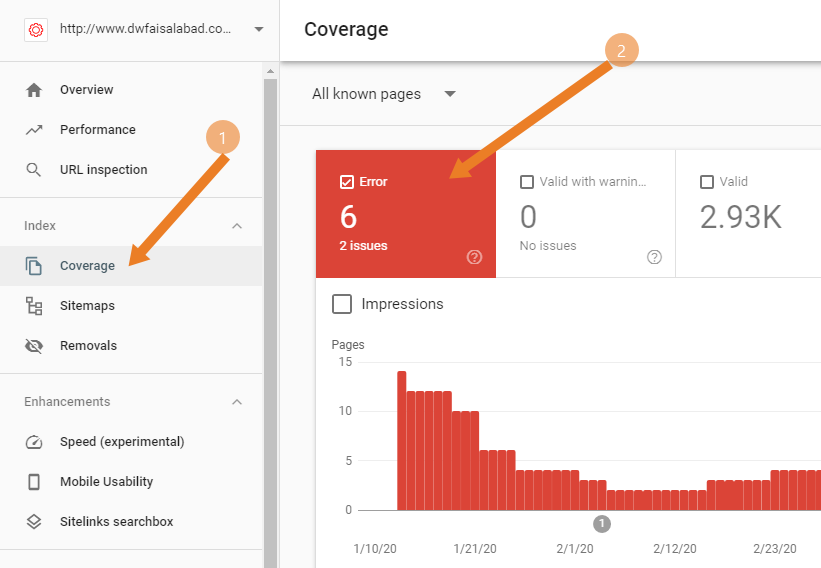
In this site. You can see there are 6 error of 2 issues. of you scroll down coverage page you will see the list of these 6 Error. Clicking on them will show you detail about error.
Keep checking Crawling Error and always try to fix it as soon as possible.
Conclusion
Indexation is very important for your website. If your content are conerstone then it is must that you manage your site unser SEO and Google Indexation.
All above strategies are selective. there are more and more strategies which are coming out day by day. Keep in touch with us to stay informed.