

Summary
SPSS LTRIM (left trim) removes leading spaces from string values. These occur especially when converting numbers to strings by using the string function. For removing trailing rather than leading spaces, see RTRIM.
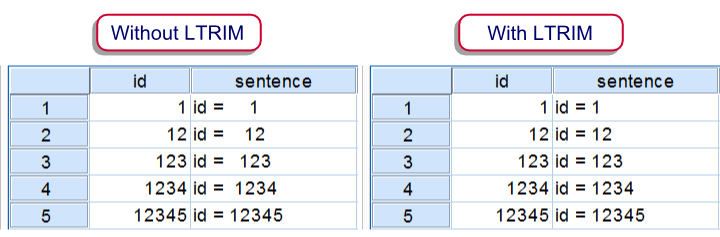 Results of CONCAT with and without LTRIM
SPSS Ltrim Example
The syntax below demonstrates a situation where you’ll like to use LTRIM. Running step 1 simply creates a mini dataset. Step 3 uses CONCAT without LTRIM and thus results in a values containing undesired spaces. Finally, step 4 shows how to avoid these by using LTRIM. The results of steps 3 and 4 are shown in the above screenshot.
SPSS Ltrim Syntax Example
*1. Create mini dataset.
data list free / id(f5).
begin data
1 12 123 1234 12345
end data.*2. Declare new string variable.
string sentence(a10).*3. Results in undesired spaces before numbers.
compute sentence = concat(“id = “,string(id,f5)).
exe.
data list free / id(f5).
begin data
1 12 123 1234 12345
end data.*2. Declare new string variable.
string sentence(a10).*3. Results in undesired spaces before numbers.
compute sentence = concat(“id = “,string(id,f5)).
exe.
*4. Ltrim undesired spaces and then concatenate.
compute sentence = concat(“id = “,ltrim(string(id,f5))).
exe.

