

Summary
SPSS transformation commands (or simply “transformations”) can be loosely defined as commands that are not immediately carried out when you run them. Instead, they are kept in mind by SPSS and executed only when necessary. The table below gives an overview of SPSS’ main tranformation commands.
Main SPSS Tranformation Commands
| COMMAND NAME | GOAL | TYPICAL USAGE |
|---|---|---|
| COMPUTE | Create variable | Very frequently |
| RECODE | Create variable | Very frequently |
| IF | Create variable | Very frequently |
| COUNT | Create variable | Sometimes |
| SELECT IF | Delete cases | Very frequently |
| SAMPLE | Delete cases | Very rarely |
| DO IF | Control other transformations | Sometimes |
| DO REPEAT | Control other transformations | Frequently |
| LOOP | Control other transformations | Sometimes |
| TEMPORARY | Control other transformations | Frequently |
| LEAVE | Control other transformations | Very rarely |
| ADD FILES | Merge data | Sometimes |
| MATCH FILES | Merge data | Sometimes |
| UPDATE | Merge data | Very rarely |
| DATA LIST | Define new data | Rarely |
| INPUT PROGRAM | Define new data | Very rarely |
| WRITE | Create data file | Very rarely |
| XSAVE | Create data file | Very rarely |
SPSS Tranformations Pending
For a better understanding of what SPSS transformations are, let’s run one. For example, let’s open age_income.sav and COMPUTE yearly incomes as income * 12. We’ll do so by running the syntax below. Compute yearly_income = income * 12.Immediately after doing so, the resulting variable seems to hold only system missing values in data view. This result is shown in the screenshot below.

Note the message “Transformations pending” in the status bar. SPSS knows you ran one or more tranformations and it’s keeping these in mind until it actually needs to execute them.
SPSS Procedures
Now let’s run some basic DESCRIPTIVES over our new variable by running descriptives yearly_income.Unsurprisingly, we now see in the output viewer window that 30 respondents have an average yearly_income of € 30013,-. Perhaps more surprisingly, the values for yearly_income have now appeared in data view and “Transformations pending” has disappeared.
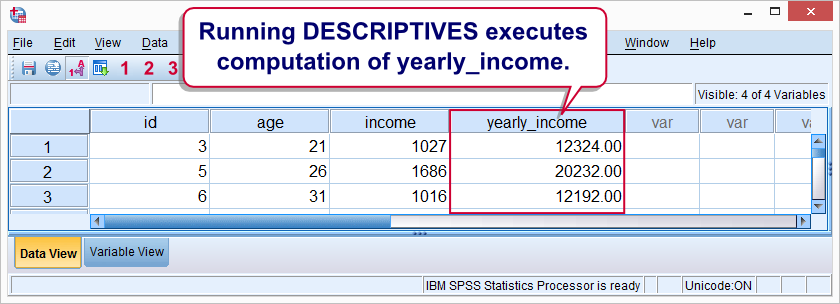
Clearly, running DESCRIPTIVES has caused the execution of our pending tranformation. Commands that execute pending transformations are collectively known as procedures in SPSS. Keep in mind here that in SPSS, “procedure” has a different meaning than in normal language. A special case is EXECUTE which does nothing except executing pending transformations.
Why doesn’t SPSS simply execute transformations as soon as they are run? Well, the basic answer is that doing so makes SPSS slower, especially for data that contain a vast number of cases.This also implies that using EXECUTE when it’s not necessary renders your syntax slower, although on modern computers the difference may be noticeable only on huge datasets.
SPSS Transformations – Why Bother?
Why should you care whether a command is a transformation, procedure or other SPSS command? Well, the basic reason is that some important SPSS commands can only be combined with tranformations, not procedures.
For instance, if you try to place DESCRIPTIVES in a LOOP, you’ll merely trigger an error.
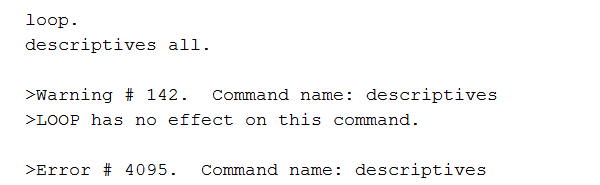
The reason is that DESCRIPTIVES is a procedure and you can only use tranformations in a LOOP. Understanding the difference between tranformations, procedures and other SPSS commands circumvents such errors and the confusion they cause among SPSS users.
A list of commands that can’t be combined with procedures is presented in the overview we saw earlier. They have been labelled “Control other transformations”.
SPSS Transformation Test
Ok, so commands such as DO IF and DO REPEAT combine only with transformations. But how can you know whether a given command is a transformation or not? Well, for one thing, the command syntax reference indicates for each command whether it’s a transformation, procedure or other command. For example, the text below indicates a transformation.

Since many SPSS users find the CSR “unreadable”, an alternative option is simply trying: run a single command an see whether or not it triggers the “Transformations pending” notification.
Sure, such trial and error will cost some effort initially. However, practice really does make perfect; in the end, figuring out how things work will save you much more time than it will cost you.

