

CSS3 transforms allow you to translate, rotate, scale, and skew elements.
A transformation is an effect that lets an element change shape, size and position.
CSS3 supports 2D and 3D transformations.
Mouse over the elements below to see the difference between a 2D and a 3D transformation:


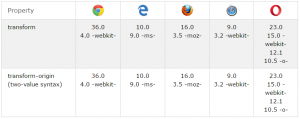
Browser Support for 2D Transforms
The numbers in the table specify the first browser version that fully supports the property.
Numbers followed by -ms-, -webkit-, -moz-, or -o- specify the first version that worked with a prefix.
CSS3 2D Transforms
In this chapter you will learn about the following 2D transformation methods:
- translate()
- rotate()
- scale()
- skewX()
- skewY()
- matrix()

The translate() Method
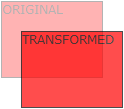
The translate() method moves an element from its current position (according to the parameters given for the X-axis and the Y-axis).
The following example moves the <div> element 50 pixels to the right, and 100 pixels down from its current position:
Example
div {
-ms-transform: translate(50px, 100px); /* IE 9 */
-webkit-transform: translate(50px, 100px); /* Safari */
transform: translate(50px, 100px);
}
The rotate() Method

The rotate() method rotates an element clockwise or counter-clockwise according to a given degree.
The following example rotates the <div> element clockwise with 20 degrees:
Example
div {
-ms-transform: rotate(20deg); /* IE 9 */
-webkit-transform: rotate(20deg); /* Safari */
transform: rotate(20deg);
}
Using negative values will rotate the element counter-clockwise.
The following example rotates the <div> element counter-clockwise with 20 degrees:
Example
div {
-ms-transform: rotate(-20deg); /* IE 9 */
-webkit-transform: rotate(-20deg); /* Safari */
transform: rotate(-20deg);
}
The scale() Method

The scale() method increases or decreases the size of an element (according to the parameters given for the width and height).
The following example increases the <div> element to be two times of its original width, and three times of its original height:
Example
div {
-ms-transform: scale(2, 3); /* IE 9 */
-webkit-transform: scale(2, 3); /* Safari */
transform: scale(2, 3);
}
The following example decreases the <div> element to be half of its original width and height:
Example
div {
-ms-transform: scale(0.5, 0.5); /* IE 9 */
-webkit-transform: scale(0.5, 0.5); /* Safari */
transform: scale(0.5, 0.5);
}
The skewX() Method
The skewX() method skews an element along the X-axis by the given angle.
The following example skews the <div> element 20 degrees along the X-axis:
Example
div {
-ms-transform: skewX(20deg); /* IE 9 */
-webkit-transform: skewX(20deg); /* Safari */
transform: skewX(20deg);
}
Try it Yourself »
The skewY() Method
The skewY() method skews an element along the Y-axis by the given angle.
The following example skews the <div> element 20 degrees along the Y-axis:
Example
div {
-ms-transform: skewY(20deg); /* IE 9 */
-webkit-transform: skewY(20deg); /* Safari */
transform: skewY(20deg);
}
Try it Yourself »
The skew() Method
The skew() method skews an element along the X and Y-axis by the given angles.
The following example skews the <div> element 20 degrees along the X-axis, and 10 degrees along the Y-axis:
Example
div {
-ms-transform: skew(20deg, 10deg); /* IE 9 */
-webkit-transform: skew(20deg, 10deg); /* Safari */
transform: skew(20deg, 10deg);
}
If the second parameter is not specified, it has a zero value. So, the following example skews the <div> element 20 degrees along the X-axis:
Example
div {
-ms-transform: skew(20deg); /* IE 9 */
-webkit-transform: skew(20deg); /* Safari */
transform: skew(20deg);
}
The matrix() Method

The matrix() method combines all the 2D transform methods into one.
The matrix() method take six parameters, containing mathematic functions, which allows you to rotate, scale, move (translate), and skew elements.
The parameters are as follow: matrix(scaleX(),skewY(),skewX(),scaleY(),translateX(),translateY())
Example
div {
-ms-transform: matrix(1, -0.3, 0, 1, 0, 0); /* IE 9 */
-webkit-transform: matrix(1, -0.3, 0, 1, 0, 0); /* Safari */
transform: matrix(1, -0.3, 0, 1, 0, 0);
}
CSS3 Transform Properties
The following table lists all the 2D transform properties:
|
Property
|
Description
|
|---|---|
| transform | Applies a 2D or 3D transformation to an element |
| transform-origin | Allows you to change the position on transformed elements |
2D Transform Methods
| Function | Description |
|---|---|
| matrix(n,n,n,n,n,n) | Defines a 2D transformation, using a matrix of six values |
| translate(x,y) | Defines a 2D translation, moving the element along the X- and the Y-axis |
| translateX(n) | Defines a 2D translation, moving the element along the X-axis |
| translateY(n) | Defines a 2D translation, moving the element along the Y-axis |
| scale(x,y) | Defines a 2D scale transformation, changing the elements width and height |
| scaleX(n) | Defines a 2D scale transformation, changing the element’s width |
| scaleY(n) | Defines a 2D scale transformation, changing the element’s height |
| rotate(angle) | Defines a 2D rotation, the angle is specified in the parameter |
| skew(x-angle,y-angle) | Defines a 2D skew transformation along the X- and the Y-axis |
| skewX(angle) | Defines a 2D skew transformation along the X-axis |
| skewY(angle) | Defines a 2D skew transformation along the Y-axis |


