Here is very critical issue that you may found while working on excel; MS excel formula is not calculating/update result automatically. There may be two types of this issue;
- A specific formula is not working but others are working fine. Learn how to fix it
- All the formulas in whole sheet are not working/calculating/updating.
First issue is not very critical as you can delete the formaula from cell and enter again with correct coding but the second issue is very irritating and frustrating issue that can stop your complete office working.
Yesterday my colleague found an error in her excel sheet, excel formula was not calculating result. I changed the value but excel didnt update result. I mannually click formula cell and then press enter to update; I mannually updated whole the sheet formulas one by one. I close the sheet and one other but facing the same issue in all sheets. Finally I found that formula is written correct but working mannualy not automatically updating results in all sheets.
Solution
Just open thees and check that the calculation options are not set to manual.
Click the Formulas tab and then the Calculation Options button. If this is set to manual, the formulas will not update unless you press the Calculate Now or Calculate Sheet buttons. Change it to Automatic and the formulas will start working.
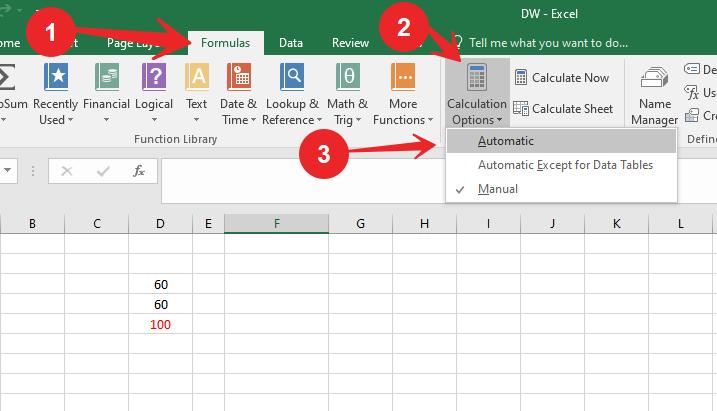
This setting can be changed by macros, or by other workbooks that you may have opened first. So if you are not aware of this setting, it could still be a reason for the formula not calculating.
Learn MS Excel Step by step Click here