How to Add Keywords and Meta Descriptions in WordPress

Do you want to properly add keywords and meta descriptions in WordPress? Meta keywords and meta descriptions allow you to improve your website’s SEO. In this article, we will show you how to properly add meta keywords and meta descriptions in WordPress. Why Add Keywords and Meta Descriptions in WordPress? Keywords and descriptions allow you […]

Urdu Installer

Urdu Typing on Computer and Internet is quite simple and easy. To type Urdu on the internet or in any software, watch this video or read bellow. Urdu keyboard (hardware) is not required for typing Urdu on the computer. You only need to install “Urdu Installer” and type Urdu anywhere on computer and internet. “Urdu Installer” […]

Working with Tables

While there are four types of database objects in Access, tables are arguably the most important. Even when you’re using forms, queries, and reports, you’re still working with tables because that’s where all of your data is stored. Tables are at the heart of any database, so it’s important to understand how to use them. […]

Managing Databases and Objects

Each Access database consists of multiple objects that let you interact with data. Databases can include forms for entering data, queries for searching within it, reports for analyzing it, and tables for storing it. Whenever you work with your database, you are working with many of these objects at once. Fortunately, Access makes managing these […]

Getting Started in Access

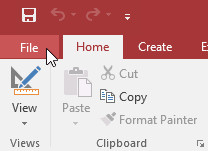
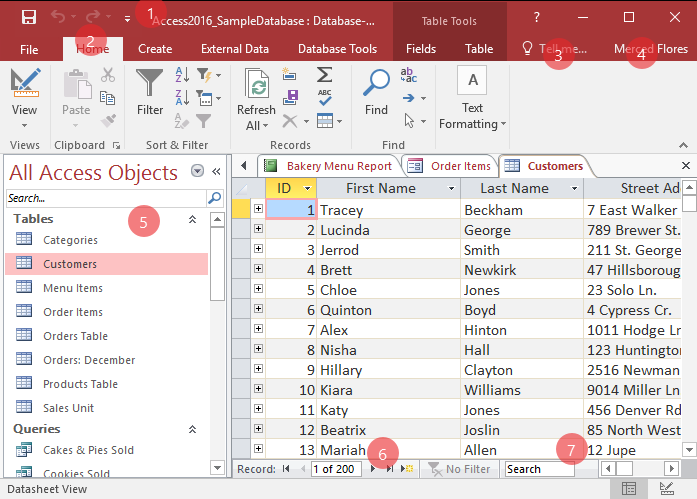
Whenever you’re learning a new program, it’s important to familiarize yourself with the program window and the tools within it. Working with Access is no different. Knowing your way around the Access environment will make learning and using Access much easier. In this lesson, you will familiarize yourself with the Access environment, including the Ribbon, […]

Introduction to Objects

Databases in Access are composed of four objects: tables, queries, forms, and reports. Together, these objects allow you to enter, store, analyze, and compile data however you want. In this lesson, you will learn about each of the four objects and come to understand how they interact with each other to create a fully functional […]

Introduction to Databases

Microsoft Access is a database creation and management program. To understand Access, you must first understand databases. In this lesson, you will learn about databases and how they are used. You will familiarize yourself with the differences between data management in Microsoft Access and Microsoft Excel. Finally, you will get a look ahead at the […]

CSS3 Media Queries

CSS2 Introduced Media TypesThe @media rule, introduced in CSS2, made it possible to define different style rules for different media types. Examples: You could have one set of style rules for computer screens, one for printers, one for handheld devices, one for television-type devices, and so on. Unfortunately these media types never got a lot […]

CSS3 Flexbox

Flexible boxes, or flexbox, is a new layout mode in CSS3. Use of flexbox ensures that elements behave predictably when the page layout must accommodate different screen sizes and different display devices. For many applications, the flexible box model provides an improvement over the block model in that it does not use floats, nor do […]

CSS3 Box Sizing

The CSS3 box-sizing property allows us to include the padding and border in an element’s total width and height. Without the CSS3 box-sizing PropertyBy default, the width and height of an element is calculated like this: width + padding + border = actual width of an elementheight + padding + border = actual height of […]

CSS3 User Interface

CSS3 has new user interface features such as resizing elements, outlines, and box sizing. In this chapter you will learn about the following user interface properties: resize outline-offset CSS3 Resizing The resize property specifies whether or not an element should be resizable by the user. The following example lets the user resize only the width […]

CSS3 Multiple Columns

The CSS3 multi-column layout allows easy definition of multiple columns of text – just like in newspapers: CSS3 Multi-column PropertiesIn this chapter you will learn about the following multi-column properties: column-count column-gap column-rule-style column-rule-width column-rule-color column-rule column-span column-width CSS3 Create Multiple ColumnsThe column-count property specifies the number of columns an element should be divided into. […]

CSS Pagination Examples

Learn how to create a responsive pagination using CSS. Simple PaginationIf you have a website with lots of pages, you may wish to add some sort of pagination to each page: Example .pagination {    display: inline-block;}.pagination a {    color: black;    float: left;    padding: 8px 16px;    text-decoration: none;} Try it Yourself […]

CSS Buttons

Learn how to style buttons using CSS. Basic Button Styling Example .button {    background-color: #4CAF50; /* Green */    border: none;    color: white;    padding: 15px 32px;    text-align: center;    text-decoration: none;    display: inline-block;    font-size: 16px;} Try it Yourself » Button Colors Use the background-color property to change the background […]

CSS Images

Learn how to style images using CSS. Rounded ImagesUse the border-radius property to create rounded images: Example Rounded Image:img {    border-radius: 8px;} Try it Yourself » Example Circled Image:img {    border-radius: 50%;} Try it Yourself » Thumbnail ImagesUse the border property to create thumbnail images. Example img {    border: 1px solid #ddd;  […]

CSS3 Animations

CSS3 animations allows animation of most HTML elements without using JavaScript or Flash!Browser Support for Animations The numbers in the table specify the first browser version that fully supports the property. Numbers followed by -webkit-, -moz-, or -o- specify the first version that worked with a prefix. What are CSS3 Animations?An animation lets an element […]

CSS3 3D Transforms

CSS3 allows you to format your elements using 3D transformations. Mouse over the elements below to see the difference between a 2D and a 3D transformation: Original                                                         […]

CSS3 2D Transforms

CSS3 transforms allow you to translate, rotate, scale, and skew elements. A transformation is an effect that lets an element change shape, size and position. CSS3 supports 2D and 3D transformations. Mouse over the elements below to see the difference between a 2D and a 3D transformation: Original               […]

CSS3 Web Fonts

CSS3 Web Fonts – The @font-face RuleWeb fonts allow Web designers to use fonts that are not installed on the user’s computer. When you have found/bought the font you wish to use, just include the font file on your web server, and it will be automatically downloaded to the user when needed. Your “own” fonts […]