

Sometime user can not see some symbols due to his/her eye problem, that’s why MS excel has facility for them to zoom the worksheet to 400% normally. See below
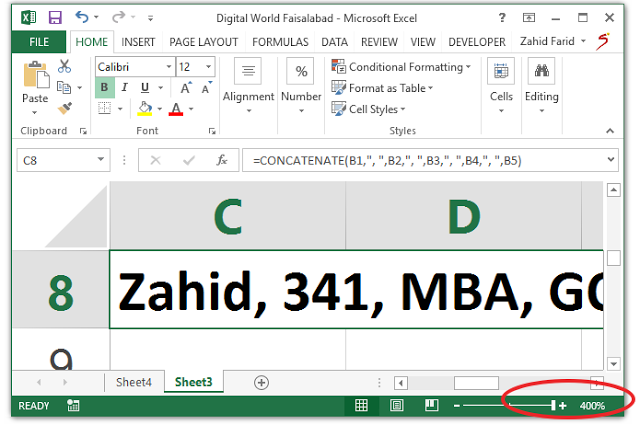
After opening the Worksheet, you can see at right bottom corner, there is zoom bar having the range from 10% to 400%. See Below

In above figure, the worksheet is in normal zoom condition (100%). To control the zooming follow these steps
- Click – Button on left side of zoom bar to Zoom Out the worksheet
- Click + Button on left side of zoom bar to Zoom In the worksheet
- Or Click and drag the center bar spot to left or right to zoom out or Zoom in the worksheet
This is the simplest way to zoom in or out the worksheet. There is another way to manage the zooming of the document. see below
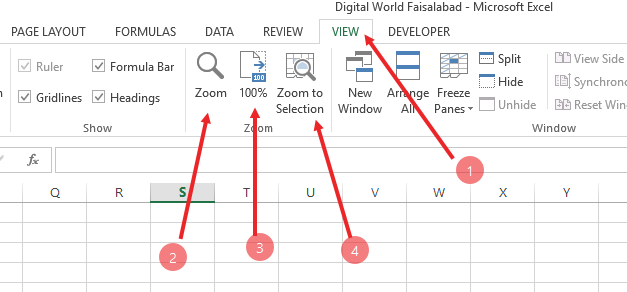
In above picture. your can see Zoon group in View tab.
Zoom group has three buttons
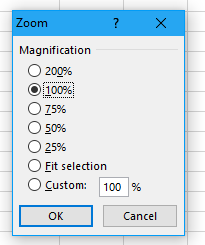
- Zoom Button: Clicking Zoom Button will show you a popup window having magnification percentage options. you can select from them or simply you can customize it by entering the percentage number. See below
- 100% Button: If you are already magnified (Zoomed in or Zoomed out) and you want to zoom the worksheet at normal 100%, simple click on 100% button.
- Zoom to Selection: if you has selected a part of worksheet and want to zoom in that selected part, then simply click on Zoom to Selection.

