Microsoft launched Windows 11 build 22000.100 to Insiders running Dev builds. The cumulative update brings with it – among other things – improvements to the taskbar UI and the system tray, adding subtle design improvements, in line with the Windows 11 experience.
- Future Windows 11 releases (Dev Channel)
- 5th October Windows 11 release (Beta Channel and, previously, Dev Channel)
This is the second build to be rolled out to the Beta channel, letting users enrolled in that channel test out the same Windows 11 builds that are heading to the Dev channel. This might indicate that the OS is nearing relative stability, with further builds like to be focused on bug fixes, readying it for general availability. Eventually, the Dev channel will move to newer development builds that are aimed at release next year.
In addition to the long list of fixes and improvements, there are also a bunch of known issues that users must be aware of. Some issues are specific to the Beta channel, where those upgrading from Windows 10 might not see the Taskbar or Start menu. The firm has listed a workaround for the issue.
Here is the complete list of issues in Windows 11 build 22000.100
REMINDER
When upgrading to Windows 11 from Windows 10 or when installing an update to Windows 11, some features may be deprecated or removed. See details here.
Start:
- In some cases, you might be unable to enter text when using Search from Start or the Taskbar. If you experience the issue, press WIN + R on the keyboard to launch the Run dialog box, then close it.
- System and Windows Terminal is missing when right-clicking on the Start button (WIN + X).
Taskbar
The Taskbar will sometimes flicker when switching input methods. Dragging an app icon to rearrange it in the Taskbar will result in the app launching or minimizing.
Widgets
- The widgets board may appear empty. To work around the issue, you can sign out and then sign back in again.
- Launching links from the widgets board may not invoke apps to the foreground.
- Widgets may be displayed in the wrong size on external monitors. If you encounter this, you can launch the widgets via touch or WIN + W shortcut on your actual PC display first and then launch on your secondary monitors.
- When using the Outlook client with a Microsoft account, Calendar, and To Do changes may not sync to the widgets in real time.
- After adding multiple widgets quickly from the widgets settings, some of the widgets may not be visible on the board.
- [Family widget] Some users may see a ‘connect a device to see screen time activity’ message even with screen time settings enable.
- [Family widget] Location information may not be available for some users on iOS.
Store
- We are working to improve search relevance in the Store including resolving an issue where in some cases the ordering of search results is inaccurate.
- The install button might not be functional yet in some limited scenarios.
- Rating and reviews are not available for some apps.
Windows Sandbox
- The Taskbar crashes continuously in Windows Sandbox. The team is investigating a fix.
Localization
- There is an issue where some Insiders may be some missing translations from their user experience for a small subset of languages running the latest Insider Preview builds.
Settings
- When launching the Settings app, a brief green flash may appear.
- When using Quick Settings to modify Accessibility settings, the settings UI may not save the selected state.
- Settings will crash when clicking “Facial recognition (Windows Hello)” under Sign-in Settings if Windows Hello is already set up.
File Explorer
- Explorer.exe crashes in a loop for Insiders using the Turkish display language when battery charge is at 100%.
- The context menu sometimes doesn’t render completely and ends up truncated.
- Clicking a desktop icon or context menu entry may result in the wrong item being selected.
Ethernet Driver Issues
Issues with device drivers are often the cause of hardware problems because drivers are necessary components for your computer to properly communicate with hardware. Your network interface card is a physical device much like everything else used by your computer, so it, too, can run into driver issues.
Sometimes, the Ethernet driver becomes so outdated it runs into problems only an update can fix. In other cases, the driver might have become corrupted due to a software conflict or virus.
How to Fix Windows 11 Ethernet Driver Problems
Gaming on Windows 11 still results in massive FPS drop
- One of the most inaccessible experiences on the future OS is gaming, unfortunately for many users who desire to continue playing their favorite games even if they are actively testing Windows 11.
- However, with Microsoft still ironing out vital wrinkles in the operating system’s core functions, they haven’t had any time to perfect this side of it.
- While some games don’t even work on Windows 11, others are playable but at the cost of performance.
Search
- After clicking the Search icon on the Taskbar, the Search panel may not open. If this occurs, restart the “Windows Explorer” process, and open the search panel again.
- When you hover your mouse over the Search icon on the Taskbar, recent searches may not be displayed. To work around the issue, restart your PC.
- Search panel might appear as black and not display any content below the search box.
Missing text visual bug
We’re all familiar with this issue by now, as we already covered it in bug articles related to previous Windows 11 builds. Missing or incomplete text on this new OS isn’t new anymore, as more and more users are reporting dealing with such problems.
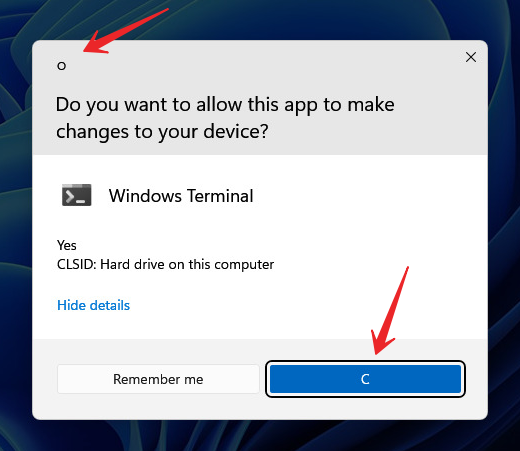
Just remember that Windows 11 has just reached its Beta testing phase so there still are issues to be sorted. Until Microsoft gets around to fixing all these visual bugs, there’s little we can do but provide feedback and wait.
Downgrading back issues
- Here’s another report from a Windows 11 user that decided to game on the new OS. After installing the beta version for Windows 11, he actually enjoyed a smoother gaming experience. But since certain Destiny 2 features weren’t working on the new operating system, he decided to revert back to Windows 10, only to find out that it was a big mistake.
- We will keep an open eye for all the reports concerning bugs, glitches, and crashes that occur after the transition from Dev to Beta. Hopefully, Microsoft can sort these situations out soon, so that we can all enjoy a much smoother, bug-free experience.
- What issues did you encounter since transitioning to the Beta channel? Let us know in the comments section below.
Localization
- There is an issue where some Insiders may be some missing translations from their user experience for a small subset of languages running the latest Insider Preview builds.
File renaming issue
- As spotted by several Windows 11 users, simple actions such as renaming a file could actually drive you crazy if you are dealing with this nasty bug.
- As you say in the video, after you select rename, you no longer have the ability to just select where to input your change in the text.
- What happens is you have to erase the whole thing and completely retype it.
Windows Security
- Device Security is unexpectedly saying “Standard hardware security not supported” for Insiders with supported hardware.
- “Automatic sample submission” is unexpectedly turned off when you restart your PC.
Issues such as the File Explorer bug might make it difficult for users to run apps reliably, so it is best to be aware of the problems before considering these builds for your daily driver. Additionally, there are some Windows Hello issues that have workarounds.
Lean about computer, Click here
Windows 11 build 22000.100 is rolling out via Windows Update to Dev channel users running the latest version of the OS. The release to the Beta channel should happen soon as the firm skipped releasing the latest 21H1 updates, citing the impending release of Windows 11 builds.
Looking through the list, other notable issues in Windows 11 build 22000.65 include the install button not working on the Microsoft Store. Of course, that may not be as concerning as the fact that Android apps still aren’t available. That’s one feature many are probably looking forward to, but it’s not ready yet.
Sources:
www.xda-developers.com
www.neowin.net
www.pcguide.com
www.windowsreport.com
www.lifewire.com